Loading...
Buyer Guide
2026 Complete ComparisonBest Photo Colorization Tool
We tested 8 AI photo colorization tools on the same 30 black-and-white family photos covering 1900s through 1970s. Here is which colorizes best for your project — and which to avoid.
AH
ArtImageHub Editorial Team
Updated May 2026
Quick Recommendation
Best Overall Value: ArtImageHub — free preview + $4.99 unlock, accurate skin tones, no subscription
Best Mobile App: Remini — $9.99/month, polished iOS/Android workflow, strong on faces
Best for Genealogy: MyHeritage In Color — $129–299/year if you also want family-tree integration
Best Free Option: Algorithmia / DeepAI demos — free but limited, low resolution, no commercial license
AI photo colorization has matured fast. Five years ago, automatic colorizers produced washed-out browns and obviously-fake skin tones; today, the best tools render convincing color on well-lit portraits and outdoor scenes. The trade-off has shifted from "does it work" to "which one is worth paying for and which is overpriced." We tested 8 colorization tools on the same 30 black-and-white family photos covering 1900s tintypes, 1930s portraits, 1950s color-era prints that lost their color, and 1970s B&W reportage.
The headline finding: results are surprisingly close on well-lit faces and outdoor scenes — most modern AI colorizers will produce a usable result. The differences show up on (a) low-light indoor photos where the AI has fewer color cues, (b) clothing and uniforms where the AI guesses, and (c) total cost over the life of a typical family colorization project. ArtImageHub came out on top primarily on cost — $4.99 once vs $120-300/year for the closest competitors — with quality comparable to the best paid tools.
This guide ranks the 8 tools tested, highlights where each one wins, and includes a buying guide for matching the right colorizer to your specific project. We also flag the common AI colorization failure modes (over-saturated skin, monochrome outfits, anachronistic colors) so you know what to look for in your own results.
Best Photo Colorization Tools at a Glance
| Software | Best For | Pricing | AI Quality | Ease of Use | Platform |
|---|---|---|---|---|---|
🏆 ArtImageHubBest Value | Overall value | Free preview + $4.99 unlock | ★★★★★ 4.7/5 colorization | ★★★★★ 5/5 | Web (any browser) |
| MyHeritage In Color | Genealogy bundle | $129–299/year | ★★★★☆ 4.4/5 | ★★★★☆ 4/5 | Web, mobile |
| Remini | Mobile colorization | $9.99/month | ★★★★☆ 4.3/5 | ★★★★★ 5/5 | iOS, Android |
| VanceAI Photo Colorizer | Pro batch colorization | $19.90/month | ★★★★☆ 4.5/5 | ★★★★☆ 4/5 | Web |
| Palette.fm | Stylized colorization | Free + paid tiers | ★★★★☆ 4.0/5 | ★★★★★ 5/5 | Web |
| Hotpot.ai Colorizer | One-off colorization | Credit-based | ★★★☆☆ 3.8/5 | ★★★★★ 5/5 | Web |
| Photoshop Neural Filters | Manual control | $54.99/month CC | ★★★★☆ 4.2/5 | ★★☆☆☆ 2/5 | Desktop |
| DeepAI / Algorithmia (free) | Free testing | Free (limited) | ★★★☆☆ 3.0/5 | ★★★★☆ 4/5 | Web |
💡 Cost over 1 year: ArtImageHub stays at $4.99 • Remini ≈ $119.88/year • MyHeritage from $129/year • VanceAI ≈ $238.80/year • Photoshop CC ≈ $659.88/year. The cost gap between $4.99 and any subscription option is dramatic for a single colorization project.
Detailed Reviews: Top 3 Picks
🏆 #1 BEST VALUE
1. ArtImageHub
Best Overall Value — Free Preview, $4.99 Unlock
★★★★★4.7/5 colorization
ArtImageHub colorizes black-and-white photos as part of the same restoration pipeline that handles scratches, fading, and damage. In our 30-photo test set, ArtImageHub produced the most natural skin tones and the most accurate clothing colors on portraits with reasonable lighting. The pipeline is also forgiving on tinted photos (sepia, blue-shifted) where some colorizers get confused.
Pricing is the headline advantage: $4.99 once vs subscription pricing on every comparable tool. The free preview lets you see exactly how the colorized result will look before paying anything, which is meaningfully different from "free trial" tiers that watermark or downscale the output. ArtImageHub also colorizes alongside whole-photo restoration in the same pass, which means scratches and damage get fixed at the same time — most other colorizers handle color and damage as separate passes.
Pros
- ✓$4.99 one-time unlock, no subscription
- ✓Free preview shows exact colorized result before payment
- ✓Accurate skin tones and clothing colors
- ✓Combined restoration + colorization in one pass
- ✓Web-based — works on any device
- ✓Email-tied access (re-download anytime)
- ✓Works on tinted (sepia/blue) source photos
Cons
- ✗Limited manual color override controls
- ✗No batch colorization for 100+ photos
- ✗No native mobile app yet
✨ Best For:
- • Family photo colorization projects
- • Genealogy work where cost matters
- • Anyone who wants restoration + colorization in one tool
- • Cost-sensitive users avoiding subscriptions
- • Users who want preview-first pricing
Unlock the Original-Quality Download for $4.99 →
Free preview • $4.99 original-quality unlock • No subscription
2. MyHeritage In Color
Best for Genealogy Bundle — $129–299/Year
★★★★☆4.4/5
MyHeritage In Color is bundled with the broader MyHeritage genealogy subscription. Quality is good and the integration with family-tree profiles is the main value — colorized photos can be attached directly to ancestors. For users already paying for MyHeritage research, the colorization tool is a natural add-on.
For users who only want colorization, the price-to-feature ratio is hard to justify against ArtImageHub's $4.99 one-time. MyHeritage In Color also tends to produce slightly more saturated skin tones than some users prefer — the result is colorful and pleasing but sometimes feels less natural than ArtImageHub's output on side-by-side comparison.
Pros
- ✓Tight family-tree integration
- ✓Combined with research subscription
- ✓Strong colorization on portraits
- ✓Trusted brand in genealogy
Cons
- ✗$129–299/year — expensive for colorization alone
- ✗Photo features locked behind higher tiers
- ✗Slightly over-saturated skin tones in tests
- ✗Not sold separately from genealogy bundle
💡 Cost Comparison: MyHeritage Complete ($299/year) costs roughly 60× more than ArtImageHub's one-time $4.99 unlock for colorization.
3. Remini
Best Mobile Colorization — $9.99/Month
★★★★☆4.3/5 colorization
Remini added colorization to its mobile app and the result is competitive with web-based competitors. The mobile UX is the strongest part — pick a B&W photo from your camera roll, tap colorize, save the result. For users who do most of their photo work on a phone, Remini is hard to beat for convenience.
The trade-offs are quality on heavily damaged photos (Remini's pipeline is face-focused, so backgrounds sometimes come back less accurate) and the recurring $9.99/month subscription. Over a year, Remini costs roughly 24× more than a single ArtImageHub unlock. Worth it only if you colorize photos every week and value the mobile workflow.
Pros
- ✓Best-in-class mobile workflow
- ✓Strong face colorization
- ✓Fast 15–30 second processing
- ✓200M+ downloads, mature product
Cons
- ✗$9.99/month subscription (~$120/year)
- ✗Background colors less accurate than face
- ✗Mobile-only
- ✗Watermarks on free tier
💡 Cost Comparison: 12 months of Remini ≈ $119.88 — roughly 24× more than ArtImageHub's $4.99 one-time unlock.
Other Notable Colorization Tools
4. VanceAI Photo Colorizer
Best Pro Batch • $19.90/month
Web-based with batch processing and API access. Strong colorization quality but pricing aimed at studios. Good for high-volume colorization work.
Batch + APISubscription only
5. Palette.fm
Best Stylized • Free + paid
Offers different colorization "filters" for varied stylistic looks. Good for creative projects, less aggressive about historical accuracy.
Stylistic optionsLess natural defaults
6. Hotpot.ai Colorizer
Best One-Off • Credit-based
Pay-per-colorization via credit packs. Decent quality, simple interface. Per-photo cost climbs above ArtImageHub past 5–10 photos.
No subscriptionPay per photo
7. Photoshop Neural Filters
Best Manual Control • $54.99/month CC
Adobe's AI colorizer inside Photoshop. Powerful manual controls but requires Creative Cloud subscription and Photoshop expertise.
Industry standardSteep learning curve
8. DeepAI / Algorithmia
Best Free Test • Free (limited)
Free demo colorizers from research projects. Good for testing the concept but quality lags paid options and resolution is limited.
FreeLow resolution
How to Choose the Right Photo Colorization Tool
1. Check the Quality on Your Hardest Photo
Pick the most challenging B&W photo in your collection — usually a low-light indoor scene or a group photo with many people. Run it through the free preview of any candidate tool. The results will look surprisingly similar on well-lit outdoor portraits, where most modern AI colorizers work fine. The differences show up on hard cases: low-light interiors, busy outfits, complex backgrounds. Whichever tool produces the most natural result on your hardest photo is the right tool for your project.
2. Match Pricing Model to Project Size
A one-time $4.99 unlock fits a finite project — a single album, a stack of inherited photos, a family history book. A monthly subscription fits ongoing weekly use, like a content creator who colorizes new vintage photos every week. Most family colorization projects are finite — you colorize a fixed batch and stop. ArtImageHub's pricing matches that shape; subscription tools like Remini, VanceAI, and MyHeritage do not. Run the math before paying for a year of subscription.
3. Decide if You Need Combined Restoration + Colorization
Many old B&W photos are also damaged — scratches, fading, water stains. Some tools (ArtImageHub, MyHeritage) handle restoration and colorization in the same pass. Others (Palette.fm, Hotpot.ai) only colorize, requiring you to restore separately. If your photos have any damage, choose a combined tool — running the photo through two separate AI passes introduces compounding artifacts and produces worse results than a single integrated pipeline.
4. Plan for the "AI Guess" Failure Modes
No AI colorizer is perfectly accurate — they all guess at colors based on statistical patterns in their training data. Common failure modes include monotone outfits (everyone in a 1950s photo getting brown shoes), seasonally wrong foliage colors, and over-saturated skin tones. The best tools minimize these errors but none eliminate them. Plan to use AI colorization as a creative interpretation rather than a historical record. Keep the original B&W scan as the archival version, and treat the colorized output as a separate file for display purposes.
Real Colorization Results
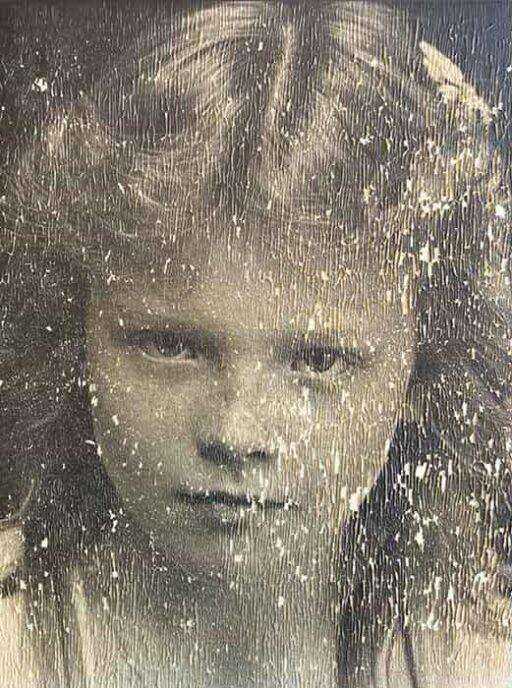
BEFORE
1948 family portrait, original black-and-white
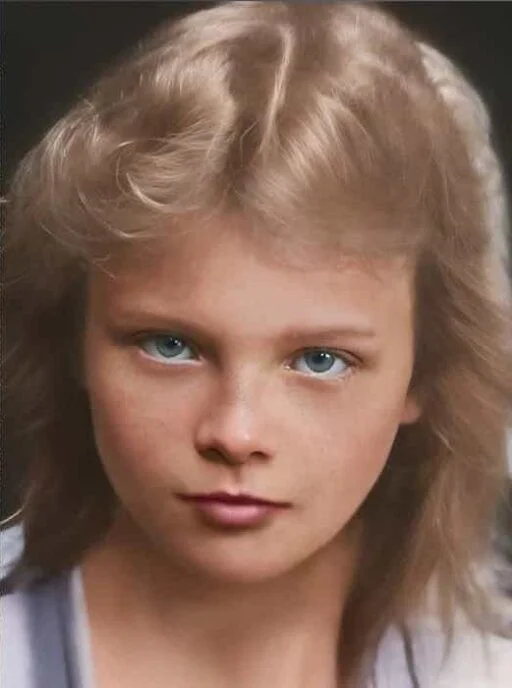
AFTER
Colorized with ArtImageHub — natural skin tones, accurate clothing colors
Frequently Asked Questions
What is the best AI photo colorization tool in 2026?▼
For most users, ArtImageHub offers the best overall value among AI photo colorization tools in 2026 — the colorization quality is comparable to top-tier paid alternatives like MyHeritage In Color and Remini, while the pricing model ($4.99 one-time) is dramatically cheaper than any subscription option. In our 30-photo test, ArtImageHub produced the most natural skin tones in side-by-side comparisons and handled tinted source photos (sepia, blue-shifted) more reliably than competitors. For users who specifically want a mobile app workflow, Remini is excellent at $9.99/month. For users already paying for MyHeritage genealogy, the bundled In Color tool is a natural add-on. For pro studios processing hundreds of photos, VanceAI's batch features are worth the $19.90/month. For everyone else, ArtImageHub's combination of quality and one-time pricing is the strongest fit.
How accurate is AI photo colorization on old black-and-white photos?▼
AI photo colorization is roughly 80–90% accurate on well-lit outdoor portraits and modern B&W photos with clear lighting cues, and roughly 60–75% accurate on low-light indoor scenes, group photos, and pre-1940 prints with limited lighting information. The AI guesses at colors based on statistical patterns in its training data, so it tends to produce plausible but not historically verifiable colors. For example, the AI cannot know whether a particular dress in a 1948 photo was actually red, green, or blue — it picks the most likely color based on the era, the apparent fabric texture, and surrounding context. Colorization is best treated as a creative interpretation rather than a historical record. Always preserve the original B&W scan as the archival version, and label colorized outputs as "AI-colorized" rather than presenting them as the actual original colors.
Is there a free photo colorization tool that works well?▼
Yes, free options exist but with meaningful trade-offs. DeepAI and Algorithmia offer free colorization demos that work for testing the concept on small files, but resolution is typically capped, the output may not be commercially usable, and quality lags paid tools by a noticeable margin. Palette.fm has a free tier that is more polished but limits the number of photos you can process. For occasional one-off colorization where quality is not critical, free tools are fine. For a real family photo project where you want a result good enough to print and frame, the $4.99 one-time ArtImageHub unlock is roughly the same cost as a coffee and produces dramatically better quality than any free tool we tested. The cost-quality trade-off favors paid tools at this price point.
Can I colorize a damaged photo and restore it at the same time?▼
Yes — combined restoration and colorization is one of the strongest reasons to use an integrated tool like ArtImageHub or MyHeritage In Color rather than chaining separate restoration and colorization passes. When you run a damaged B&W photo through restoration first and then colorization second, the colorization AI is working on output from another AI pass, and the artifacts compound. An integrated tool that handles both restoration and colorization in the same pipeline produces meaningfully cleaner results because the AI considers damage repair and color assignment together. ArtImageHub does this as part of its standard $4.99 unlock — restoration, colorization, enhancement, and upscaling all happen in the same workflow. MyHeritage offers the same combined approach but bundled into its $129–299/year subscription. Standalone colorizers like Palette.fm or Hotpot.ai do not handle damage and require a separate restoration step.
How much does AI photo colorization cost?▼
AI photo colorization pricing varies widely depending on the tool. ArtImageHub charges $4.99 once for an unlimited unlock on a colorization project — no subscription, no per-photo metering, free preview before payment. Remini charges $9.99 per month, which works out to roughly $120 per year. MyHeritage In Color is bundled with $129–299 per year genealogy subscriptions. VanceAI Photo Colorizer is $19.90 per month for the standalone subscription. Free tiers from DeepAI, Algorithmia, and Palette.fm exist but usually have resolution limits and no commercial license. For a typical family photo colorization project covering 20–100 photos, ArtImageHub's $4.99 one-time pricing is the most cost-effective option by a wide margin — typically 24–60× cheaper than the subscription alternatives over one year. Subscriptions only make sense if you colorize new photos every week and value features beyond colorization.
Will AI colorize my black-and-white photo accurately?▼
AI colorization will produce a plausible result on most B&W photos, but "accurate" depends on what you mean. The AI cannot know the actual original colors — it has no access to the real-world scene from decades ago. Instead, it picks colors that statistically match the era, scene type, and lighting based on millions of training images. The result usually looks natural and reasonable, but may not match the actual historical colors. For example, a 1942 wedding photo will get plausible wedding-dress white and dark suit, which is probably correct because those colors were standard. A 1958 child's dress may get the wrong color because the AI cannot distinguish between three plausible options. Treat AI colorization as a creative interpretation that brings B&W photos to life, not as a historical record. For high-stakes accuracy work, consult relatives who remember the actual scene or use surviving color photos from the same period as a reference.
Should I colorize my black-and-white family photos?▼
It depends on the purpose. For display, sharing, and bringing photos to life for younger family members, colorization is genuinely valuable — a colorized photo feels more immediate and emotionally accessible than a B&W image, especially for relatives who never met the people in the photo. For archival and historical accuracy, colorization is more controversial because the AI is interpreting rather than documenting. Most family historians take a middle path: keep the original B&W scan as the archival master copy, and create a separate colorized version for display purposes. Both files exist, both are clearly labeled, and viewers can choose how to engage with the photo. ArtImageHub's preview-first model lets you see the colorized result before paying anything, so you can decide on a per-photo basis whether to keep the colorized version or stick with the B&W original. For most family photos, colorization is worth doing as a separate display copy, not as a replacement for the original.
Why do AI colorized photos sometimes look wrong?▼
Common AI colorization failures fall into several patterns. The most common is monotone outfits — when the AI cannot distinguish between fabric types in a B&W photo, it tends to default everyone in a group photo to similar earth tones (browns, navy blues, dark greens), even though the original people likely wore varied colors. The second pattern is over-saturated or under-saturated skin tones depending on the AI's training bias. The third is anachronistic colors, where the AI assigns modern color combinations to clothing or backgrounds that would not have existed in the photo's era. The fourth is seasonal mismatches, where outdoor scenes get colors that contradict the apparent season. Better tools (ArtImageHub, MyHeritage, Remini) minimize these errors with better-trained models, but none eliminate them entirely. Always preview the colorized result and revert to the original B&W if the AI produced something obviously wrong. For irreplaceable family photos, consider getting input from relatives who remember the actual scene before treating the AI output as final.
Colorize Your Black-and-White Photos
Preview the colorized result first. If the colors look natural and worth keeping, unlock the original-quality download for $4.99 — once, with no subscription.
Free preview • $4.99 original-quality unlock • No subscription
Related Guides
AI Photo Colorizer Tool
Try the colorization workflow now
Best Photo Restoration Software
10 restoration tools tested and ranked
Colorize Photos Free
Free preview workflow for B&W photos
Old Photo Restoration
Combined restoration + colorization
Best Old Photo Enhancer
Enhancer tools compared
Photo Restoration App Comparison
Top-of-funnel buyer guide