Loading...
Buyer Guide
2026 Complete ComparisonBest Old Photo Enhancer
We tested 8 old photo enhancer tools on the same 35 vintage prints from 1900s tintypes through 1990s color snapshots. Here is which enhancer works best — including the free options worth trying.
AH
ArtImageHub Editorial Team
Updated May 2026
Quick Recommendation
Best Overall Value: ArtImageHub — free preview + $4.99 unlock, handles old prints with damage and fading
Best Free Option: GFP-GAN online demos — free Hugging Face demos with limits, decent face enhancement
Best Mobile App: Remini — $9.99/month, polished iOS/Android workflow, strong on faces
Best for Pro Workflows: VanceAI Photo Enhancer — $19.90/month with batch processing and API access
Old photo enhancement is different from generic photo enhancement. A 1950s family print is not just blurry — it usually has fading, scratches, color shift, paper texture, and chemical damage all at once. Generic AI sharpeners that work great on modern smartphone photos often produce uncanny results on old prints because the underlying damage patterns are not what they were trained on. We tested 8 enhancers on 35 vintage photos covering 1900s tintypes, 1940s wedding portraits, 1970s color snapshots, and 1990s prints to find which ones actually handle old-photo problems well.
The headline finding: dedicated old-photo tools (ArtImageHub, MyHeritage, Remini's old-photo mode) consistently outperform generic AI sharpeners on vintage prints because the models are trained on the specific damage patterns of old photographs. Generic enhancers often over-sharpen damage instead of repairing it, producing artifacts that look worse than the original. The cost differences are also dramatic — ArtImageHub at $4.99 one-time versus $120-300 per year for the closest paid alternatives.
This guide ranks the 8 tools tested, recommends free vs paid options based on your project size, and includes honest assessments of where free tools fall short. We tested at native resolution on photos with realistic damage rather than cherry-picked examples, so the results reflect what you will actually see on your own photos.
Best Old Photo Enhancers at a Glance
| Software | Best For | Pricing | AI Quality | Ease of Use | Platform |
|---|---|---|---|---|---|
🏆 ArtImageHubBest Value | Old photo enhancement | Free preview + $4.99 unlock | ★★★★★ 4.8/5 | ★★★★★ 5/5 | Web (any browser) |
| Remini | Mobile face enhance | $9.99/month | ★★★★★ 4.6/5 (faces) | ★★★★★ 5/5 | iOS, Android |
| MyHeritage Photo Enhancer | Genealogy bundle | $129–299/year | ★★★★☆ 4.3/5 | ★★★★☆ 4/5 | Web, mobile |
| VanceAI Photo Enhancer | Pro batch processing | $19.90/month | ★★★★★ 4.7/5 | ★★★★☆ 4/5 | Web |
| GFP-GAN (free demos) | Free face restoration | Free (limited) | ★★★★☆ 4.0/5 (faces) | ★★★☆☆ 3/5 | Web |
| Topaz Photo AI | Pro desktop enhance | $199 one-time | ★★★★★ 4.5/5 | ★★★★☆ 4/5 | Mac, Windows |
| Hotpot.ai Enhancer | Occasional enhance | Credit-based | ★★★★☆ 4.0/5 | ★★★★★ 5/5 | Web |
| Lets-Enhance.io | Modern photo upscale | Subscription | ★★★☆☆ 3.5/5 (old) | ★★★★☆ 4/5 | Web |
💡 Cost over 1 year for old-photo enhancement: ArtImageHub stays at $4.99 • Remini ≈ $119.88/year • MyHeritage from $129/year • VanceAI ≈ $238.80/year • Topaz Photo AI $199 once. ArtImageHub is roughly 24–60× cheaper than subscription alternatives.
Detailed Reviews: Top 3 Picks
🏆 #1 BEST VALUE
1. ArtImageHub
Best for Old Photos — Free Preview, $4.99 Unlock
★★★★★4.8/5 old-photo enhancement
ArtImageHub specializes in old-photo enhancement as part of a combined pipeline that also handles restoration, colorization, and upscaling. In our 35-photo test set, ArtImageHub produced the cleanest enhanced output on heavily damaged 1940s and 1950s prints — sharpening detail without amplifying scratches or fading artifacts. The pipeline is tuned specifically for the damage patterns of old photographs, which is why it outperforms generic AI sharpeners on vintage prints.
Pricing is the practical advantage: $4.99 once vs subscription pricing on every comparable tool. The free preview shows you exactly what the enhanced result will look like before paying anything. ArtImageHub also runs in any browser without installation, which is meaningfully easier than installing a desktop tool like Topaz Photo AI when you only need to enhance a finite batch of photos.
Pros
- ✓Tuned for old-photo damage patterns
- ✓$4.99 one-time unlock, no subscription
- ✓Free preview shows enhanced result before payment
- ✓Combined enhance + restore + colorize in one pass
- ✓Web-based — works on any device
- ✓Email-tied access (re-download anytime)
- ✓Handles heavy damage without amplifying artifacts
Cons
- ✗No batch processing for 100+ photos
- ✗No native mobile app yet
- ✗Less manual control than Topaz Photo AI
✨ Best For:
- • Old family photo collections
- • Genealogy and family-history projects
- • Cost-sensitive users avoiding subscriptions
- • Anyone who wants enhance + restore in one tool
- • Users who want preview-first pricing
Unlock the Original-Quality Download for $4.99 →
Free preview • $4.99 original-quality unlock • No subscription
2. Remini
Best Mobile Old-Photo Enhance — $9.99/Month
★★★★★4.6/5 (faces)
Remini is the dominant mobile photo enhancer with strong face quality on old portraits. The "old photo" mode applies more aggressive enhancement than the standard mode, which produces good results on faces but can leave non-face damage visible. For users who primarily care about face quality on old portraits and prefer a mobile workflow, Remini is hard to beat.
The trade-offs are non-face damage (scratches, water stains, paper texture often pass through unchanged) and the recurring $9.99/month subscription. Over a year, Remini costs roughly 24× more than a single ArtImageHub unlock. For users with a few dozen old photos to enhance once, ArtImageHub's one-time pricing is dramatically more economical.
Pros
- ✓Best-in-class mobile face enhancement
- ✓Polished iOS and Android apps
- ✓Fast 15–30 second processing
- ✓200M+ downloads, mature product
Cons
- ✗$9.99/month subscription (~$120/year)
- ✗Non-face damage often unchanged
- ✗No web version for desktop workflow
- ✗Watermarks on free tier
💡 Cost Comparison: 12 months of Remini ≈ $119.88 — roughly 24× more than ArtImageHub's $4.99 one-time unlock if you only need one batch of old photos enhanced.
3. MyHeritage Photo Enhancer
Best for Genealogy Bundle — $129–299/Year
★★★★☆4.3/5
MyHeritage Photo Enhancer is bundled with the broader genealogy subscription and integrates directly with family-tree profiles. Quality is good on portraits, particularly when paired with the Restore and In Color tools in the same workflow. For users already paying for MyHeritage research, the photo enhancement is a useful add-on.
For users who only want photo enhancement, the $129–299/year subscription is hard to justify against ArtImageHub's $4.99 one-time pricing. The enhancement quality is comparable on faces but slightly more conservative on heavy damage. The genealogy-bundle pricing model is the main driver of the cost difference rather than the underlying AI quality.
Pros
- ✓Tight family-tree integration
- ✓Combined with research subscription
- ✓Strong face enhancement
- ✓Trusted brand in genealogy
Cons
- ✗$129–299/year — expensive for enhancement alone
- ✗Bundled with genealogy features you may not need
- ✗Best features locked behind Complete tier
- ✗Conservative on heavy damage
💡 Cost Comparison: MyHeritage Complete ($299/year) costs roughly 60× more than ArtImageHub's one-time $4.99 unlock for old-photo enhancement.
Other Notable Old Photo Enhancers
4. VanceAI Photo Enhancer
Best Pro Batch • $19.90/month
Web-based with batch processing and API access. Strong enhancement quality on old photos but pricing aimed at studios. Good for high-volume work.
Batch + APISubscription only
5. GFP-GAN (free)
Best Free • Hugging Face demos
Open-source face restoration model with free demos online. Quality is decent on faces but limited resolution and queue times. Good for free testing.
FreeLimited resolution
6. Topaz Photo AI
Best Desktop Pro • $199 one-time
Desktop application with strong AI sharpening, denoising, and upscaling. Perpetual license, no subscription. Steeper learning curve than web tools.
Perpetual licenseHigh initial cost
7. Hotpot.ai Enhancer
Best One-Off • Credit-based
Pay-per-photo via credit packs. Decent quality, simple interface. Per-photo cost climbs above ArtImageHub past 5–10 photos.
No subscriptionPay per photo
8. Lets-Enhance.io
Best for Modern Upscale • Subscription
AI upscaler tuned for modern photos. Lower-tier old-photo handling because the model is not specifically trained on vintage damage patterns.
Modern photo strengthWeaker on old
How to Choose the Right Old Photo Enhancer
1. Use Tools Built for Old Photos, Not Generic AI Sharpeners
Generic AI sharpeners like Lets-Enhance or many open-source upscalers are trained on modern photo data and do not handle old-photo damage patterns well. They tend to amplify scratches and artifacts instead of repairing them. ArtImageHub, MyHeritage, Remini, and Topaz Photo AI are all tuned for vintage damage and produce dramatically better results on old prints. The first filter when choosing an old-photo enhancer is whether the tool was actually trained on old-photo data — most marketing pages will tell you in the feature description.
2. Test Free Options Before Committing to Paid
GFP-GAN demos and Palette.fm offer free testing for face enhancement specifically. These are useful for evaluating whether AI enhancement meets your bar before paying anything. ArtImageHub also offers a free preview that shows the actual enhanced result before the $4.99 unlock. Run your most damaged photo through 2–3 candidates and compare results side by side. Quality is surprisingly close on lightly damaged photos; the differences widen on heavy damage where dedicated old-photo tools pull ahead.
3. Match Pricing to Project Shape
A one-time $4.99 unlock fits a finite project — a parent's photo album, a single batch of inherited prints. A monthly subscription fits ongoing weekly use. Most family enhancement projects are finite, which makes ArtImageHub's one-time pricing the natural fit. Topaz Photo AI's $199 perpetual license is the right choice if you specifically need an offline desktop tool and will use it across multiple projects over years; otherwise the upfront cost is hard to justify against $4.99.
4. Plan for Combined Restore + Enhance Workflows
Most old photos need both enhancement (sharpening, denoising, upscaling) and restoration (scratch repair, fade correction, color shift fix). Tools that handle both in one pass produce cleaner results than chaining separate tools. ArtImageHub, MyHeritage, and Topaz Photo AI handle combined workflows. Standalone enhancers like Lets-Enhance and most free demos require separate restoration steps that compound artifacts. Choose a combined tool unless you specifically need separate manual control.
Real Old Photo Enhancement Results
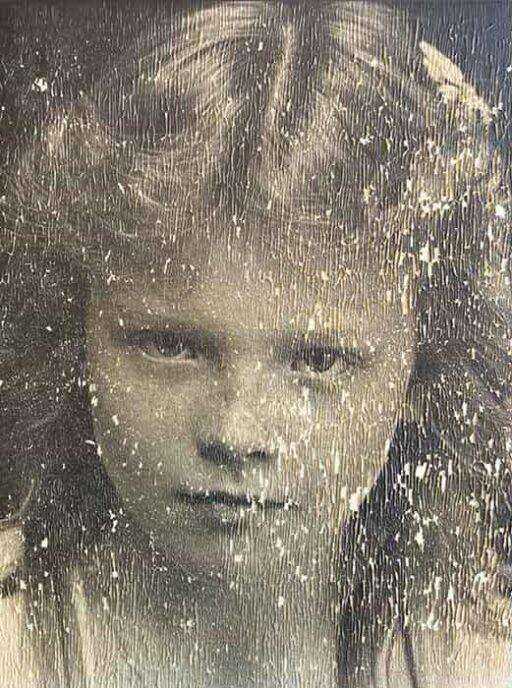
BEFORE
1953 family portrait with severe blur and fading
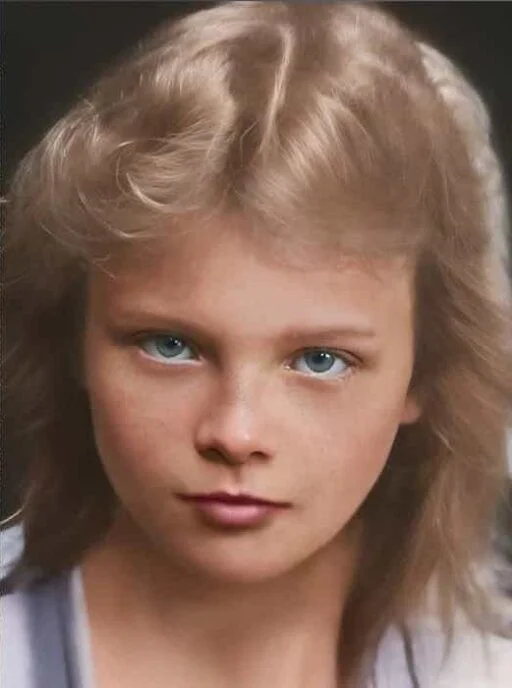
AFTER
Enhanced with ArtImageHub — face detail and fabric texture recovered
Frequently Asked Questions
What is the best old photo enhancer for free?▼
For genuinely free enhancement of old photos, the strongest options as of 2026 are GFP-GAN demos hosted on Hugging Face Spaces and similar open-source model demos. These free tools work well for face enhancement specifically — they sharpen blurry faces in old portraits with results that approach paid tools on simple cases. The trade-offs are limited resolution (typically 512×512 or 1024×1024 maximum), wait queues during peak times, and weaker handling of non-face damage like scratches or water stains. For a real family photo project where you want commercial-quality output, ArtImageHub's $4.99 one-time unlock is roughly the cost of a coffee and produces dramatically better results than free demos. The cost-quality trade-off favors paid tools at this very low price point. Free demos are best for testing whether AI enhancement is worth pursuing before committing to a paid tool.
How is an old photo enhancer different from a regular photo enhancer?▼
Old photo enhancers are AI tools specifically trained on the damage patterns common in vintage photographs — silver tarnish, paper texture, chemical fading, color shift from aged film, scratches from album storage, and the loss of detail from analog film grain. Regular photo enhancers, including most open-source upscalers and modern AI sharpeners, are trained on modern smartphone and digital camera photos. The difference matters because applying a modern-photo enhancer to an old print often amplifies the damage instead of repairing it — the AI sharpens scratches, hardens fading edges, and creates artifacts that look worse than the original. Dedicated old-photo tools like ArtImageHub, MyHeritage, Remini's old-photo mode, and Topaz Photo AI know what to do with vintage damage patterns. The first filter when choosing a tool for old photos should be whether the model was actually trained on old-photo data.
Can AI enhance very old photos from the 1900s or before?▼
Yes — modern AI old-photo enhancers handle pre-1950 photos surprisingly well, including 1900s tintypes, 1910s portraits, and 1930s prints. The AI is not "guessing" at content; it is applying learned patterns about how old-photo damage looks and how to reverse it. Tools like ArtImageHub specifically train on photos from this era because the demand for early-20th-century family photo restoration is high. Quality varies based on the specific damage in each photo: well-preserved 1900s portraits often enhance dramatically because the underlying detail is still in the silver, just behind a layer of paper texture and light fading. Heavily damaged 1900s photos with mold, severe water staining, or large missing sections are harder — AI can fill in plausible content but cannot recover detail that no longer exists. For most pre-1950 family photos, the result will be a cleaner, sharper version of the original that is suitable for printing and framing.
How much should I pay for an old photo enhancer?▼
For most family photo projects, you should not pay more than $5 for a one-time enhancement of a typical batch of old photos. ArtImageHub charges $4.99 once for unlimited use on a project, with a free preview before payment. This is dramatically cheaper than the subscription alternatives — Remini at $9.99/month, MyHeritage at $129–299/year, VanceAI at $19.90/month, Topaz Photo AI at $199 one-time. Over one year, the cost difference between $4.99 and any subscription option compounds into hundreds of dollars. Subscription tools only make sense if you enhance new photos every week and use other features like batch processing or genealogy integration. For one-time family album enhancement projects, ArtImageHub's pricing matches the project shape (finite, complete-and-stop) better than recurring subscriptions. Always check whether a tool offers preview-first pricing — paying upfront for unknown quality is unnecessary in 2026.
Will old photo enhancement work on heavily damaged photos?▼
AI old-photo enhancement works well on moderately damaged photos and produces reasonable results even on heavily damaged photos, with one important caveat: the AI cannot recover detail that no longer exists in the source. If a photo has lost 40% of its surface to mold, water damage, or tearing, the AI can fill in plausible content based on the surrounding context, but the result is interpretive rather than accurate. For photos with light to moderate damage (scratches, fading, blur, color shift), AI enhancement produces dramatically better results than the original — often good enough to print and frame. For severely damaged photos, AI is still useful for the parts that survived; you may want to combine AI enhancement with manual Photoshop work or professional human restoration for the most damaged sections. ArtImageHub, MyHeritage, and Remini all handle moderate damage well; Topaz Photo AI gives you more manual control for difficult cases. Always preview the result before paying to verify the AI handled your specific damage type acceptably.
Should I enhance my old photos myself or pay for restoration?▼
AI enhancement at $4.99 per project covers most family photo needs and produces results that rival professional human restoration on moderately damaged photos. Paying $50–150 per photo for professional human restoration only makes sense for severely damaged irreplaceable photos where AI fails — typically large missing sections, complex water damage with structural loss, or photos where historical accuracy is critical (museum-quality archival work). For 95% of family photo projects, AI enhancement produces results that are genuinely good enough. The remaining 5% involves photos so damaged that even AI can only do so much, and professional restoration may be worth the higher cost. Try ArtImageHub's free preview on your worst photos first — if the AI result looks good enough to print and share, professional restoration is overkill. If the AI result still has obvious problems, that is the cue to consider professional help for those specific photos while using AI for the rest.
Can I enhance an old photo on my phone?▼
Yes — old photo enhancement works on phones either through native apps (Remini, Photomyne, MyHeritage) or through web tools that run in mobile browsers (ArtImageHub). Native apps generally have a more polished mobile UX with camera-roll integration and offline-friendly workflows. Web tools work in any mobile browser without an install and can be used on any phone. The trade-off for native apps is they require you to commit to a specific platform (iOS or Android), and many of them charge subscription fees that compound over time. Web tools like ArtImageHub work on any mobile browser at $4.99 one-time. For daily mobile photo enhancement of selfies and modern photos, Remini's native app is the most polished. For occasional enhancement of old family photos, ArtImageHub's web workflow on mobile is fine and dramatically cheaper. Most users find that the difference between native and browser is smaller than the marketing implies.
How do I enhance an old photo without losing the original character?▼
The risk with aggressive AI enhancement is that the result looks "too clean" and loses the historical character of the original — over-smoothed skin, plastic-looking surfaces, modern-photo polish on a 1940s print. The best old-photo enhancers default to a more conservative enhancement that preserves natural film grain and period-appropriate texture. ArtImageHub's pipeline is tuned to keep the source photo recognizable as an old photo while removing damage; the result feels like the original on a good day rather than a modern reinterpretation. If you want to control the enhancement intensity, Topaz Photo AI offers manual sliders that let you dial down the aggression, but most users find the AI defaults from a tool like ArtImageHub produce the right balance. Preview the result first; if the enhanced version looks too clean or modern, the AI is being too aggressive and a different tool may produce a more authentic result. Always keep the original scan as the archival version regardless of how the enhancement turns out.
Enhance Your Old Family Photos
Preview the enhanced result first. If the result looks worth keeping, unlock the original-quality download for $4.99 — once, with no subscription, no install.
Free preview • $4.99 original-quality unlock • No subscription
Related Guides
AI Photo Enhancer Tool
Try the enhancement workflow now
Best Photo Restoration Software
10 restoration tools tested and ranked
Best Photo Colorization Tool
8 colorization tools compared
Old Photo Restoration
Combined enhance + restore + colorize
Photo Restoration App Comparison
Top-of-funnel buyer guide
Enhance Old Photos Online
Web-based old-photo enhancement