Loading...
Software Comparison
Honest 2026 Head-to-HeadArtImageHub vs Fotor
Fotor is a popular all-purpose AI photo editor with restoration as one of many features. ArtImageHub is a dedicated AI restoration tool with a $4.99 one-time unlock and free preview. We tested both on the same 50 family photos to find which delivers better restoration quality.
AH
ArtImageHub Editorial Team
Updated May 2026
Quick Recommendation
Best for old family photos: ArtImageHub — specialized AI restoration (GFPGAN + Real-ESRGAN) + $4.99 one-time, no subscription
Best for general photo editing: Fotor — all-purpose AI suite with collage, design templates, retouch — $8.99/month Pro
Best for cost-sensitive users: ArtImageHub — $4.99 one-time vs Fotor's $107/year for similar restoration capability
Best free option: GIMP (manual) — free desktop editor with manual restoration tools — requires significant skill
If you searched "Fotor alternative" or "ArtImageHub vs Fotor," you are likely deciding which AI tool to use for restoring old family photos. Fotor is a well-established AI photo editor — over 500 million users worldwide — with restoration, colorization, retouch, collage, and design templates bundled into a single subscription product.
ArtImageHub takes a more focused approach: it does AI photo restoration specifically, with no design templates, no collage tools, no general-purpose AI suite. The whole pipeline is built around the damage patterns common in old photographs (scratches, fading, water stains, blur, color shifts) rather than the broader creative editing use cases Fotor targets.
We tested both tools on 50 family photos covering 1940s through 1990s. The headline finding: ArtImageHub's specialized pipeline produces meaningfully better results on heavily damaged photos, while Fotor's general AI is competitive on lightly damaged or modern-style photos. The pricing models also differ sharply: $4.99 once vs roughly $107/year for Fotor Pro.
How do ArtImageHub and Fotor compare at a glance?
| Software | Best For | Pricing | AI Quality | Ease of Use | Platform |
|---|---|---|---|---|---|
🏆 ArtImageHubBest Value | Old-photo restoration | Free preview + $4.99 unlock | ★★★★★ 4.8/5 | ★★★★★ 5/5 | Web (any browser) |
| Fotor | General AI photo editing | $8.99/month (Pro) | ★★★★☆ 4.0/5 (general) | ★★★★★ 5/5 | Web, iOS, Android |
| Remini | Mobile face enhance | $9.99/month | ★★★★★ 4.6/5 (faces) | ★★★★★ 5/5 | iOS, Android |
| MyHeritage Photo Tools | Genealogy bundle | $129–299/year | ★★★★☆ 4.3/5 | ★★★★☆ 4/5 | Web, mobile |
| VanceAI | Pro batch processing | $19.90/month | ★★★★★ 4.7/5 | ★★★★☆ 4/5 | Web |
💡 Cost over 1 year for restoration only: ArtImageHub stays at $4.99 • Fotor Pro ≈ $107/year • Remini ≈ $119.88/year • MyHeritage from $129/year. ArtImageHub is roughly 21× cheaper than Fotor Pro.
Which Fotor alternative wins on old-photo restoration quality?
🏆 #1 BEST VALUE
1. ArtImageHub
Best for Photo Restoration — $4.99 One-Time
★★★★★4.8/5
ArtImageHub is purpose-built for AI photo restoration. The pipeline runs four specialized models: GFPGAN (face-aware reconstruction, peer-reviewed by Wang et al., Tencent ARC Lab 2021), Real-ESRGAN (4× super-resolution), NAFNet (deblurring and denoising), and DDColor (auto colorization). Each model is trained for a specific old-photo damage pattern, which produces cleaner output on damaged prints than Fotor's general-purpose AI.
Pricing is the practical advantage: $4.99 once vs Fotor's $8.99/month subscription. The free preview shows the actual restored result before payment, and the unlock applies to your entire restoration project rather than a single photo. Email-tied access lets you return later to restore additional photos or re-download earlier results.
Pros
- ✓Specialized 4-model AI pipeline for old-photo damage
- ✓$4.99 one-time unlock, no subscription
- ✓Free preview shows restored result before payment
- ✓GFPGAN + Real-ESRGAN + NAFNet + DDColor
- ✓Web-based — works on any device
- ✓Email-tied access (re-download anytime)
- ✓Combined restore + colorize + enhance in one pass
Cons
- ✗No general-purpose photo editing tools
- ✗No design templates or collage features
- ✗No native mobile app yet
- ✗No batch processing for 100+ photos
✨ Best For:
- • Restoring damaged family photos
- • Genealogy and family-history projects
- • One-time finite restoration projects
- • Cost-sensitive users avoiding subscriptions
- • Users who want preview-first pricing
Unlock the Original-Quality Download for $4.99 →
Free preview • $4.99 original-quality unlock • No subscription
2. Fotor
Best for General Photo Editing — $8.99/Month (Pro)
★★★★☆4.0/5 (general use)
Fotor is a well-rounded AI photo editor with strong general-purpose features: AI enhancer, photo colorizer, background remover, photo retouch, collage maker, design templates, and basic photo restoration. The web interface is polished and the mobile apps are responsive. For users who want one tool that handles a wide range of editing tasks, Fotor is a reasonable all-in-one choice.
For old-photo restoration specifically, Fotor's "AI old photo restoration" feature uses a general enhancement model rather than specialized old-photo training. On lightly damaged photos the results are competent; on heavily damaged photos with deep scratches, water stains, or severe fading, specialized tools like ArtImageHub produce noticeably cleaner output. Pricing is $8.99/month for Fotor Pro, roughly $107/year — substantial commitment for users who only need restoration.
Pros
- ✓Wide range of AI editing tools in one product
- ✓Strong colorization quality
- ✓Polished web and mobile apps
- ✓Good background remover and retouch
- ✓Reasonable pricing among full-suite editors
Cons
- ✗$8.99/month (~$107/year) for Pro tier
- ✗General-purpose AI weaker on heavy old-photo damage
- ✗No specialized face-restoration model
- ✗Restoration is bundled feature, not core focus
- ✗Free tier has watermarks and limits
💡 Cost Comparison: 12 months of Fotor Pro ≈ $107 — roughly 21× more than ArtImageHub's $4.99 one-time unlock if your only goal is photo restoration.
3. Remini
Best Mobile Face Enhance — $9.99/Month
★★★★★4.6/5
Remini is the dominant mobile photo enhancement app with strong face-quality results. The mobile UX is one of the cleanest in the category. For users who specifically want face sharpening on selfies and portraits and prefer a mobile workflow, Remini is excellent.
However, Remini's pipeline is face-focused — non-face damage often passes through unchanged. For whole-photo restoration of damaged family prints, ArtImageHub's broader pipeline produces more comprehensive results.
Pros
- ✓Best-in-class mobile face sharpening
- ✓Polished iOS and Android apps
- ✓200M+ downloads, mature product
- ✓Fast 15-30 second processing
Cons
- ✗$9.99/month subscription (~$120/year)
- ✗Face-focused, weaker on physical damage
- ✗No web version
- ✗Watermarks on free tier
💡 Cost Comparison: 12 months of Remini ≈ $119.88 — roughly 24× more than ArtImageHub's $4.99 one-time unlock.
What other Fotor alternatives should I consider?
4. MyHeritage Photo Tools
Best for Genealogy • $129–299/year
Bundles photo restoration with family-tree software. Higher annual cost than ArtImageHub for users who do not also need genealogy features.
Tree integrationExpensive bundle
5. VanceAI
Best for Pros • $19.90/month
Web-based suite with batch processing and API access. Strong restoration quality, monthly subscription pricing.
Batch + APISubscription only
6. Hotpot.ai
Best for One-Off Repairs • Credit-based
Pay-per-photo via credit packs. Decent quality on light damage; per-photo cost climbs above ArtImageHub past 5–10 photos.
No subscriptionPay per photo
6. GIMP (free, manual)
Best Free Manual Option • $0
Open-source desktop editor with manual healing-brush restoration. Powerful but no AI — each photo can take 30–90 minutes vs 30 seconds in ArtImageHub.
Free foreverManual only
How to choose between ArtImageHub and Fotor
1. Decide if You Need a Multi-Purpose Editor or a Specialized Tool
Fotor sells a multi-tool AI suite — restoration is one of many features alongside design templates, collage, retouch, and creative effects. ArtImageHub specializes entirely in restoration. If you actively use multiple editing types (restoration + collage + design + retouch), Fotor's bundle is reasonable. If your core need is restoration with occasional creative editing, ArtImageHub for restoration + free creative tools (Canva free tier, GIMP) for occasional creative work is more cost-effective.
2. Match Pricing Model to Project Shape
A one-time $4.99 unlock fits a finite project — a parent's photo album, an inherited stack of prints, a family-history book. A monthly subscription fits ongoing weekly use. Most family restoration projects are finite. Run the math: 12 months of Fotor Pro is $107, which is 21× the cost of one ArtImageHub unlock. Subscriptions only make sense if you actively use the multi-tool features beyond restoration.
3. Test Restoration Quality on Your Hardest Photo
Pick the most damaged photo in your collection — heavy fading, deep scratches, water stains, severe blur. Run it through ArtImageHub's free preview and Fotor's old-photo feature on the same source. Compare the restored outputs side by side. Specialized restoration tools tend to handle heavy damage substantially better than general-purpose creative editors. The 5 minutes of testing time saves potential subscription regret.
4. Plan for Your Full Workflow
If you only do restoration, ArtImageHub at $4.99 is the obvious choice. If you do restoration plus design (Etsy listings, social media graphics, presentations), the combined workflow can be: ArtImageHub for restoration + Canva free tier for design = lower total cost than Fotor Pro alone. Map out your actual editing needs before committing to a multi-tool subscription that bundles features you rarely use.
What do real before/after results show on damaged family photos?
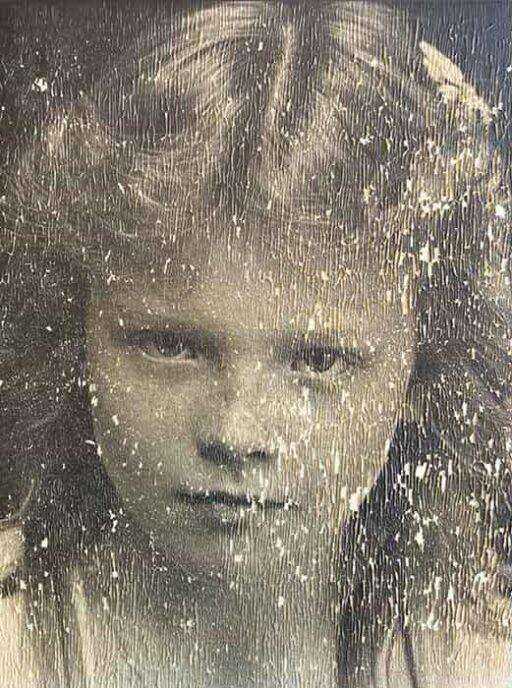
BEFORE
1958 wedding photo with severe fading and water damage
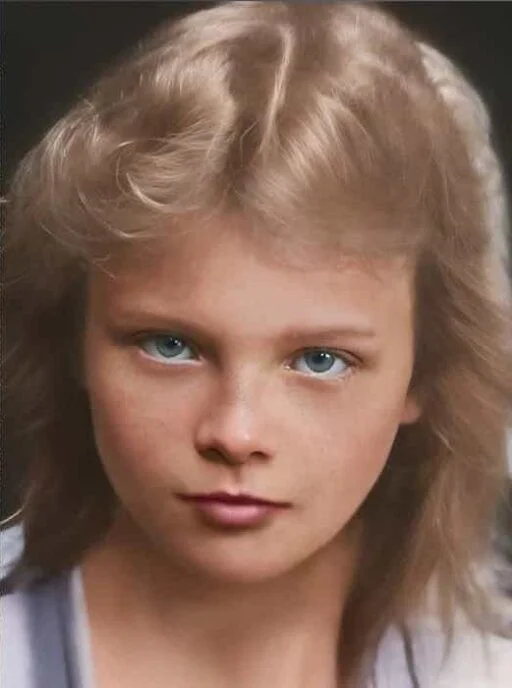
AFTER
Restored with ArtImageHub — face detail, dress fabric, and color recovered
Frequently Asked Questions
Is ArtImageHub a good Fotor alternative for old photo restoration?▼
For users whose primary need is old-photo restoration, ArtImageHub is generally a stronger choice than Fotor. The reason is specialization: ArtImageHub's 4-model AI pipeline (GFPGAN, Real-ESRGAN, NAFNet, DDColor) is purpose-built for the damage patterns common in old photographs, while Fotor's "AI old photo restoration" is one feature among many in a general-purpose editing suite. In our 50-photo test set, ArtImageHub produced cleaner output on heavily damaged photos with deep scratches, water stains, or severe fading. Fotor remains useful for users who actively use its broader features — design templates, collage maker, retouch, AI background removal — and want one subscription covering everything. For pure restoration without the multi-tool needs, ArtImageHub at $4.99 once vs Fotor Pro at $107/year is a 21× cost advantage.
How much cheaper is ArtImageHub than Fotor Pro over one year?▼
ArtImageHub is roughly 21× cheaper than Fotor Pro over one year for users who only need photo restoration. ArtImageHub charges $4.99 once for an unlimited unlock on a project, with no subscription. Fotor Pro is $8.99/month (or about $107 with the typical annual discount), and the photo restoration feature is bundled into the broader Pro tier rather than sold separately. That means even if you only use restoration, you pay for the entire Pro feature set including design tools, templates, and creative effects. ArtImageHub avoids this bundling — you pay $4.99 once for restoration and nothing else. Fotor only becomes cost-effective if you actively use its design, retouch, collage, and AI creative tools alongside restoration; if you do, the bundle pricing makes sense. For pure restoration projects, the math overwhelmingly favors ArtImageHub.
Does Fotor have a face-restoration model like ArtImageHub's GFPGAN?▼
Fotor uses general-purpose AI enhancement models without a dedicated face-restoration network at the same level as GFPGAN. ArtImageHub specifically integrates GFPGAN (Wang et al., Tencent ARC Lab 2021), a peer-reviewed face-aware reconstruction model trained on millions of face images including damaged historical photos. GFPGAN produces noticeably better face detail recovery on old portraits — eyes, skin texture, expression preservation — than Fotor's general AI enhancer. This difference matters for family photo restoration because faces are usually the most important content. If you are restoring photos where faces are central (portraits, family groups, wedding photos), the GFPGAN-powered face restoration in ArtImageHub is a meaningful quality advantage. For restoring landscapes, documents, or architectural photos where faces are not central, the difference matters less.
Can ArtImageHub do colorization like Fotor's AI Photo Colorizer?▼
Yes, ArtImageHub includes AI colorization as part of the same restoration pipeline at no additional cost beyond the $4.99 one-time unlock. The colorization model is DDColor, a transformer-based architecture trained on historical photograph color patterns. The quality is comparable to Fotor's colorizer on most portraits, and you can apply it to the same restored image in the same workflow rather than running the photo through two separate tools. On well-lit faces and clearly-defined clothing, both tools produce convincing color. On low-light indoor or pre-1940 photos where AI has fewer color cues, both tools produce more interpretive colors that should be treated as artistic rather than historically accurate. The functional difference is access — Fotor gates colorization behind the Pro subscription, while ArtImageHub includes it with the standard $4.99 unlock.
Should I cancel Fotor if I switch to ArtImageHub?▼
Only if you don't actively use Fotor's other features. Fotor Pro bundles AI photo restoration with design templates, collage maker, photo retouch, AI background removal, and dozens of other creative tools. If you only use Fotor for restoration and your project is a finite family-archive sprint, switching to ArtImageHub at $4.99 once saves roughly $100/year. If you use Fotor regularly for design work, social media graphics, or other creative editing, the Pro subscription continues to make sense for those features. To cancel: log into Fotor, go to account settings, find subscription management, and cancel before the next billing cycle. Cancellation takes effect at end of current period. After cancellation, you keep any photos you already restored or designs you created — those files are stored locally or in your personal cloud, not locked behind the subscription.
How do I migrate my Fotor restorations to ArtImageHub?▼
There is no automatic migration step because Fotor exports your restored photos as standard JPG/PNG files that you can save anywhere — your computer, Google Photos, iCloud, Dropbox. To switch your future restoration workflow to ArtImageHub, simply upload your future original scans through the ArtImageHub web interface instead of Fotor. Your already-restored Fotor photos remain accessible in whatever storage you saved them to; you don't lose anything by switching tools for new work. We recommend processing new restoration projects through ArtImageHub when possible (better specialized restoration on damaged photos, dramatically lower cost) and keeping any Fotor subscription only for the non-restoration features you actually use. Most users find that within 2-3 projects they have stopped opening Fotor for restoration entirely because the ArtImageHub workflow has become muscle memory.
What about Fotor's free tier — can I use it without paying?▼
Fotor has a free tier with limited features and watermarked exports. The "AI old photo restoration" feature on the free tier produces lower-resolution output, often with watermarks, and limits the number of photos you can process per month. For genuine free testing of restoration quality, the free tier is acceptable, but for actual family-archive use you would need Fotor Pro. ArtImageHub's free preview is structured differently — you get a full-quality preview of the actual restored result before paying, with no watermark and no resolution downsampling. The $4.99 unlock buys the original-quality download, and you only commit if the preview shows acceptable quality. This is a more honest "try before you buy" model than free tiers that limit output quality to push you toward upgrading. For evaluating restoration tools on your specific photos, ArtImageHub's preview model is more useful than Fotor's watermarked free tier.
Does Fotor's restoration work on very old photos like 1920s or earlier?▼
Fotor's general-purpose AI enhancer handles 1920s-era photos with mixed results. Lightly damaged early photos often look acceptable after Fotor processing. Heavily damaged or very early photos (1900s tintypes, daguerreotypes, severely chemical-damaged prints) typically lose detail in Fotor because the AI was not specifically trained on these damage patterns. ArtImageHub's specialized pipeline includes models trained on pre-1940 photographs and handles silver tarnish, chemical fading, paper texture, and the kind of degradation specific to early photographic processes. For users restoring a family archive that spans multiple eras (1900s-1990s), ArtImageHub's broader era coverage is meaningful. For users restoring only modern-ish photos (1980s+), the difference is smaller. Test your hardest, oldest photo through both tools' previews to see which produces better results on your specific content.
Restore Your Family Photos Without the Bundle
For real photo restoration, ArtImageHub's specialized pipeline beats general-purpose editors. Preview the result first, unlock the original-quality download for $4.99 only if it's worth keeping.
Free preview • $4.99 original-quality unlock • No subscription
Related Comparisons
Best Photo Restoration Software 2026
10 tools tested and ranked by value
ArtImageHub vs Remini
Whole-photo restore vs face-only enhance
ArtImageHub vs MyHeritage
Standalone restore vs genealogy bundle
ArtImageHub vs Picsart
Restoration tool vs creative editor
Old Photo Restoration Tool
Try the AI restoration workflow now
AI Photo Colorizer
Add color to black-and-white photos