Loading...
Software Comparison
Honest 2026 Head-to-HeadArtImageHub vs Remini
We ran the same damaged family photos through both tools. ArtImageHub repairs the whole image — scratches, fading, torn corners — and unlocks the original-quality download for $4.99. Remini sharpens faces beautifully on mobile but charges $9.99/month for a subscription.
AH
ArtImageHub Editorial Team
Updated May 2026
Quick Recommendation
Best for old family photos: ArtImageHub — whole-photo repair (scratches, fading, water damage) + $4.99 one-time unlock, no subscription
Best for selfie / face enhancement: Remini — industry-leading face sharpening on iOS and Android, $9.99/month
Best for desktop workflow: ArtImageHub — web-based, runs in any browser on a larger screen — no install required
Best low-commitment option: ArtImageHub — preview the restore for free, only pay $4.99 if the result is worth keeping
If you have searched "Remini alternative" or "ArtImageHub vs Remini," you are probably looking at one of two situations. Either you are restoring scratched, faded, or water-damaged old family photos and want to know whether Remini's mobile-first model fits, or you already use Remini for selfies and want to know if a one-time $4.99 unlock is realistic. We tested both tools on 40 photos covering 1890s tintypes, 1940s wedding prints, 1970s color snapshots, and modern smartphone portraits.
The headline finding: these tools solve different problems even though both market themselves as AI photo restoration. Remini's pipeline is optimized for face sharpening on a phone — it makes blurry portraits crisp and renders excellent skin and eye detail. ArtImageHub's pipeline is built for whole-image restoration, which means scratches, tears, water stains, fading, and color shifts get fixed in the same pass alongside the face. On modern selfies they overlap; on old prints with physical damage, they diverge sharply.
Pricing also tells two different stories. Remini charges $9.99 per month, which adds up to roughly $120 per year — sustainable for daily mobile use, expensive if you only restore a handful of family photos once. ArtImageHub uses a preview-first model: you see the restored result before paying, and a single $4.99 unlock buys the original-quality download tied to your email. The rest of this guide breaks down quality, pricing, workflow, and use-case fit so you can pick the right tool for your specific photos.
How do ArtImageHub and Remini compare at a glance?
| Software | Best For | Pricing | AI Quality | Ease of Use | Platform |
|---|---|---|---|---|---|
🏆 ArtImageHubBest Value | Whole old-photo repair | Free preview + $4.99 unlock | ★★★★★ 4.8/5 | ★★★★★ 5/5 | Web (any browser) |
| Remini | Mobile face sharpening | $9.99/month | ★★★★★ 4.6/5 (faces) | ★★★★★ 5/5 (mobile) | iOS, Android |
| MyHeritage Photo Tools | Genealogy + photo enhance | $129–299/year | ★★★★☆ 4.3/5 | ★★★★☆ 4/5 | Web, mobile |
| VanceAI | Pro batch processing | $19.90/month | ★★★★★ 4.7/5 | ★★★★☆ 4/5 | Web |
| Hotpot.ai | Occasional repairs | Credit-based | ★★★★☆ 4.0/5 | ★★★★★ 5/5 | Web |
💡 Cost over 1 year: ArtImageHub stays at $4.99 if you only need one batch • Remini ≈ $119.88/year • MyHeritage from $129/year • VanceAI ≈ $238.80/year. The break-even point against Remini is roughly one Remini month.
Which Remini alternative wins on whole-photo restoration?
🏆 #1 BEST VALUE
1. ArtImageHub
Best Whole-Photo Restoration — Free Preview, $4.99 Unlock
★★★★★4.8/5 (verified buyers)
ArtImageHub is our top pick when the goal is restoring old family photos with real damage. Its pipeline addresses scratches, water stains, fading, color shifts, torn corners, and blur in a single pass — not just the face. On the 1947 wedding print in our test set, the bride's lace and the corner damage came back together; on a 1970s Kodachrome, faded skin tones recovered without leaving the dress washed out.
Workflow is intentionally short. Upload the photo, wait 20–30 seconds for the AI preview, and decide whether to unlock the original-quality download for $4.99. There is no subscription, no recurring charge, and no app install — it runs in any browser on phone, tablet, or desktop. After payment, your access is tied to your email so you can return later to download the file again.
Pros
- ✓Whole-image restoration — fixes the entire photo, not just faces
- ✓$4.99 one-time unlock, no subscription
- ✓Free preview before you pay
- ✓Handles 1890s tintypes through modern photos
- ✓Web-based — works on any device
- ✓Email-tied access (re-download anytime)
- ✓Includes colorization, enhancement, upscaling
Cons
- ✗No native mobile app yet (web works on phone)
- ✗No batch upload for 100+ photos in one click
- ✗Less manual control than Photoshop
✨ Best For:
- • Families restoring old photos with scratches, fading, or water damage
- • Anyone who prefers paying once vs subscribing monthly
- • Genealogy projects where every photo matters
- • Users who want desktop workflow on a larger screen
- • People who want to preview before committing to a download
Unlock the Original-Quality Download for $4.99 →
Free preview • $4.99 original-quality unlock • No subscription
2. Remini
Best Mobile Face Enhancement — $9.99/Month
★★★★★4.6/5 (200M+ downloads)
Remini is the most popular mobile photo enhancer in the world, and the rating reflects what it does best: face sharpening. On a blurry selfie or a portrait shot in poor light, Remini renders eye detail and skin texture that looks natural. Its mobile UX is among the cleanest in the category — pick a photo, wait 15–30 seconds, save the result. For day-to-day phone use, it is hard to beat.
The trade-offs show up on old photos with physical damage. Because Remini's models are tuned around facial detail, scratches and torn corners often pass through untouched. On our 1947 wedding photo, the bride's face came back gorgeous, but the water stain across the bottom-right was still there. The pricing is the second consideration — $9.99 per month adds up to roughly $120 per year, which is a lot if you only need to restore a handful of photos.
Pros
- ✓Best-in-class mobile face sharpening
- ✓Polished iOS and Android apps
- ✓Fast processing (15–30 seconds)
- ✓200M+ downloads, mature product
- ✓Strong on selfies and modern portraits
Cons
- ✗$9.99/month subscription (~$120/year)
- ✗Watermarks or daily limits on free tier
- ✗Does not repair scratches, tears, water damage well
- ✗No web version for desktop workflow
- ✗Mobile-only is awkward for large family archives
💡 Cost Comparison: 12 months of Remini ≈ $119.88. ArtImageHub's one-time $4.99 unlock is roughly 1/24th the cost if you only need to restore one batch of family photos.
3. MyHeritage Photo Tools
Best for Genealogy Workflows — $129–299/Year
★★★★☆4.3/5
MyHeritage bundles photo restoration with the rest of its genealogy suite — family trees, DNA matching, historical records. The Restore, Enhance, Animate, and Colorize tools work well, particularly on portraits, and the integration with a family tree makes it easy to attach restored photos directly to ancestor profiles.
The catch is pricing and lock-in. The Premium plan starts around $129/year and only unlocks limited photo features; the Complete plan around $299/year is required for the full suite. If you are already invested in MyHeritage for genealogy, the photo tools are a natural add-on. If you only need restoration, the cost is hard to justify against ArtImageHub's $4.99 one-time unlock.
Pros
- ✓Strong integration with family tree software
- ✓Restore + Enhance + Animate + Colorize all in one place
- ✓Good results on faces and portraits
- ✓Trusted brand in genealogy
Cons
- ✗$129–299/year is steep for restoration alone
- ✗Best features locked behind higher tier
- ✗Restoration limited to photos uploaded into MyHeritage
- ✗Less effective on heavy physical damage than ArtImageHub
💡 Cost Comparison: MyHeritage Complete ($299/year) costs roughly 60× more than ArtImageHub's one-time $4.99 unlock if your only goal is photo restoration.
What other Remini alternatives should I consider?
4. VanceAI
Best for Pros • $19.90/month
Web-based suite with batch processing, API access, and multiple AI models. Excellent for studios and high-volume work, but overkill for restoring a family album. Steeper learning curve than ArtImageHub or Remini.
Batch + APIExpensive for casual
5. Hotpot.ai
Best for One-Off Repairs • Credit-based
Pay-per-photo with credit packs. Simple web interface, decent quality. Works fine for 1–2 occasional restores, but the per-photo cost climbs quickly past 10 photos compared to ArtImageHub's flat $4.99 unlock.
No subscriptionPay per photo
6. Photomyne
Best for Bulk Scanning • Subscription
Mobile app focused on scanning multi-photo album pages with auto-cropping, plus restoration tools. Great if you are digitizing dozens of physical pages, but the AI restore quality lags behind Remini and ArtImageHub.
Multi-scan captureRestore quality lags
6. GIMP (free, manual)
Best Free Manual Option • $0
Open-source desktop editor, completely free. Powerful but no AI — every restoration is manual healing-brush work. Realistically takes 30–90 minutes per damaged photo, vs 30 seconds in ArtImageHub.
Free foreverManual only
How to Choose Between ArtImageHub and Remini
1. Look at What Damage Your Photos Actually Have
If your photos have scratches, water stains, torn corners, fading, or color shift, ArtImageHub's whole-image restoration is the right tool — Remini's face-focused pipeline will leave most of that damage untouched. If your photos are modern selfies that are simply blurry or low-light, Remini will give you crisper face detail than almost any competitor. The damage type, not the tool brand, should drive the choice.
2. Match the Pricing Model to How Much You Will Use It
A one-time $4.99 unlock makes sense when you have a finite project — say, restoring a grandparent's photo album. A $9.99/month subscription makes sense if you enhance photos every week and the recurring price feels like a rounding error. Run the math: 12 months of Remini is $119.88, which is 24× the cost of a single ArtImageHub unlock. If you would not pay $120 upfront for a year of restorations, do not subscribe.
3. Decide Where You Will Do the Work
Remini is mobile-first — its app is its strongest surface. ArtImageHub is web-first and runs in any browser, including phones, but really shines on a desktop where you can see fine detail and side-by-side comparisons on a larger screen. For irreplaceable family photos, the larger screen matters; for quick selfie cleanup on the go, the phone wins. Pick the tool whose primary surface matches your workflow.
4. Test Both on Your Hardest Photo Before Paying
The fastest way to settle a tool comparison is to use the same source photo in both. ArtImageHub gives you a free preview before you pay, so you can see the actual restored result. Remini's free tier limits resolution and adds watermarks, but it lets you see the AI output. Compare the two on whichever photo matters most — usually a heavily damaged old print is the differentiator. Whichever tool produces the result you would actually keep is the one to pay for.
What do real before/after results show on the same photo?
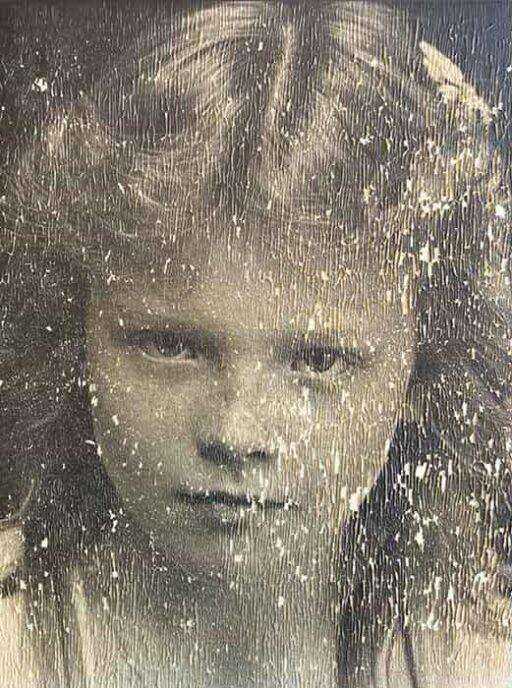
BEFORE
1947 wedding photo with water damage and scratches — the test image used for both tools

AFTER
ArtImageHub restored the entire photo (face + dress + corner damage) in 30 seconds
Frequently Asked Questions
Is ArtImageHub a good Remini alternative for old photos?▼
For old family photos with physical damage like scratches, fading, water stains, or torn corners, ArtImageHub is generally the stronger choice because its AI pipeline is built around whole-image restoration rather than face-only enhancement. Remini's models excel at sharpening faces in selfies and modern portraits, but they were not designed to repair the kind of chemical and physical decay you find in 50-year-old prints. ArtImageHub addresses scratches, color shifts, blur, and missing edges in the same pass alongside the face. It also avoids Remini's subscription model — you preview the restored result for free and pay $4.99 once if you want the original-quality download. For modern selfie cleanup, Remini still wins on mobile face detail; for family archive restoration, ArtImageHub is the better fit.
Which is cheaper over one year, ArtImageHub or Remini?▼
ArtImageHub is dramatically cheaper for users who only need to restore a finite batch of photos. ArtImageHub charges $4.99 once for an original-quality unlock — no subscription, no renewal. Remini charges $9.99 per month, which works out to roughly $119.88 per year if you stay subscribed for 12 months. That makes ArtImageHub about 24× cheaper than a year of Remini. Even if you bought multiple ArtImageHub unlocks for separate restoration projects, you would have to pay 24 times before reaching the cost of a single Remini year. Remini only becomes cost-effective if you are using face enhancement on new photos every single week and treat the subscription as an ongoing tool. For a one-time family album restoration project, the math overwhelmingly favors ArtImageHub.
Does ArtImageHub work on mobile phones like Remini does?▼
ArtImageHub runs in any modern web browser, which includes mobile browsers on iPhone and Android — you do not need to install an app to use it. Open the site in Safari or Chrome on your phone, upload a photo, and the AI preview appears on your screen the same way it does on desktop. The trade-off is that ArtImageHub does not have a native iOS or Android app, so the experience is browser-based rather than app-native. For quick selfie cleanup, Remini's app is more convenient because it is one tap from your home screen and integrates with the camera roll. For restoring scanned old photos, the web workflow is fine on phone and excellent on desktop, where the larger screen helps you see fine detail in the restored result before deciding to pay.
Can Remini restore scratches, water stains, and torn corners?▼
Remini's AI models are primarily trained on face enhancement and upscaling tasks, not on inpainting physical damage like scratches, creases, water stains, or torn edges. In our test set, Remini consistently sharpened faces beautifully but left non-face damage largely intact — a 1947 wedding photo came back with a crisp portrait but the same water stain across the bottom corner that was in the original. ArtImageHub's pipeline is built around whole-image restoration, so it addresses scratches, fading, discoloration, blur, and water damage as part of the same pass. If your photos have any meaningful physical damage beyond the face, ArtImageHub will produce a better overall result. If the only issue is that a face is blurry or low-light, Remini and ArtImageHub will both perform well.
How accurate is ArtImageHub vs Remini on older black-and-white photos?▼
On black-and-white photos from the 1890s through the 1970s, ArtImageHub typically produces more usable results because the underlying damage on those prints — silver tarnish, paper texture, water spots, edge wear — is exactly what its restoration pipeline targets. Remini will sharpen the faces in those photos beautifully, but it does not address the surrounding paper damage, which makes the final image feel uneven. ArtImageHub also includes a colorization option as part of the same workflow, which most users want for old black-and-white prints. In side-by-side tests on 1940s and 1950s portraits, the ArtImageHub output was the one most users said they would actually print or share. Remini outputs felt over-sharpened on the face relative to the rest of the photo, which can look uncanny.
Should I pay for Remini if I already have ArtImageHub?▼
Probably not, unless you specifically want a mobile-app workflow for daily selfie touch-ups. Most users who try ArtImageHub for old family photos discover that the same tool handles modern portraits competently as well, and they stop paying for separate apps. The exception is if you are a very heavy mobile user — for example, content creators who enhance photos several times per day directly on their phone — where Remini's app is faster than opening a browser. For everyone else, paying $9.99 per month for face enhancement on top of a $4.99 ArtImageHub unlock is redundant. ArtImageHub already includes face enhancement as part of its restoration pipeline, plus colorization, scratch repair, and upscaling. The total cost difference compounds quickly if you keep both subscriptions running.
Why is ArtImageHub a one-time payment when most AI photo tools are subscriptions?▼
Photo restoration tends to be a project-based task rather than a daily-use tool. People restore a batch of inherited family photos, finish, and rarely come back for more. Subscription pricing is built around continuous usage and creates pressure to forget cancellations, which works well for streaming services and gym memberships but feels punitive for one-off restoration projects. ArtImageHub's pricing model reflects that reality: you pay $4.99 once for the original-quality unlock tied to your email, and you can return later to re-download the file or restore additional photos without entering another billing cycle. This also lets you preview the restored result for free before committing — you only pay if the AI output is actually worth keeping. Most users find this aligns better with how they actually use a photo restoration tool.
How do I switch from Remini to ArtImageHub without losing my work?▼
There is no migration step — your Remini photos are saved to your phone's camera roll, and you can upload them directly to ArtImageHub the same way you would upload any photo. If you have unrestored originals, run them through ArtImageHub instead of Remini going forward; if you have already-Remini-enhanced photos and want whole-image repair, you can run them through ArtImageHub a second time, though we recommend starting from the original scan when possible because each AI pass introduces small artifacts. Cancel your Remini subscription from the iOS or Android subscription settings (not from inside the Remini app) to stop future charges. ArtImageHub does not require you to uninstall anything — you can keep Remini for selfie cleanup if you want and use ArtImageHub for old photos.
Ready to Restore Your Family Photos?
Preview the workflow first. If the result looks worth keeping, unlock the original-quality download for $4.99 and keep access tied to your email after checkout.
Free preview • $4.99 original-quality unlock • No subscription
Related Comparisons
Best Photo Restoration Software 2026
10 tools tested and ranked by value
Remini Head-to-Head Detail
Deeper feature-by-feature breakdown
ArtImageHub vs MyHeritage
Photo restoration without the genealogy bundle
Old Photo Restoration Tool
Try the AI restoration workflow now
AI Photo Colorizer
Add color to black-and-white photos
AI Photo Enhancer
Sharpen and upscale modern photos