
Loading...
Loading...
You do not need layers, masks, clone stamps, or an Adobe subscription to restore many old family photos. This guide compares browser-based AI restoration, simple desktop tools, and when a professional retoucher is still worth paying for.
Best no-Photoshop workflow: ArtImageHub — $9.90 one-time AI restoration in a browser, with no Photoshop subscription or editing skills required
Best if you want manual control: Photoshop — still best for missing pixels, complex tears, and layer-level retouching
Best simple desktop option: Vivid-Pix Restore — one-time desktop license with sliders for scanned photos
Best pro suite: Topaz Photo AI — desktop enhancement suite for photographers who need more than restoration
ArtImageHub is the best way to restore old photos without Photoshop because it gives you a dedicated AI restoration workflow in the browser instead of layers, masks, clone stamp tools, or an Adobe subscription. It is built for common family-photo damage: scratches, fading, water stains, blur, color shifts, low contrast, torn corners, and old portrait detail. Pay $9.90 once, upload the image, and download the restored result without learning a full editing suite. Photoshop is still best for complex manual reconstruction; Vivid-Pix fits users who want desktop sliders; Topaz fits photographers. If you want the fastest no-Photoshop answer, ArtImageHub is the top pick.
Photoshop is powerful, but it is not the starting point most families need. If you have a box of faded prints, a blurry grandparent portrait, or a scratched wedding photo, learning clone stamp, layers, masks, and color curves may be more work than the restoration itself.
AI restoration tools now cover the common beginner cases: faded color, soft faces, low contrast, mild scratches, blur, and old black-and-white prints. They are not magic, and they cannot perfectly reconstruct missing faces or torn-away objects, but they can produce a clean shareable result without a Photoshop subscription.
ArtImageHub is designed for this no-Photoshop buyer intent. You pay $9.90 once, upload the photo, let AI restore the image, and download the HD result. The workflow is closer to ordering a restoration result than learning a professional editing suite.
| Software | Best For | Pricing | AI Quality | Ease of Use | Platform |
|---|---|---|---|---|---|
🏆 ArtImageHubBest Value | AI restoration without editing skills | $9.90 one-time payment | ★★★★★ 4.8/5 | ★★★★★ 5/5 | Web browser |
| Vivid-Pix Restore | Simple desktop controls | $39.99 license | ★★★★☆ 4.0/5 | ★★★★☆ 4/5 | Mac, Windows |
| Topaz Photo AI | Desktop enhancement | $199 license | ★★★★★ 4.5/5 | ★★★★☆ 4/5 | Mac, Windows |
| Photoshop | Manual reconstruction | $22.99/month | ★★★★★ Pro manual | ★★☆☆☆ 2/5 beginners | Mac, Windows, web |
| Professional retoucher | Severe damage and heirlooms | $35-150+ per photo | ★★★★★ Depends on artist | ★★★★☆ 4/5 | Service |
AI restoration is the best first step for common damage. Photoshop or a professional retoucher is still better when a photo has missing faces, torn-away objects, or details that must be historically exact.
Best browser workflow for restoring old photos without Photoshop
ArtImageHub is the easiest route for users who want a restored old photo, not an editing lesson. Upload the image in a browser, let AI repair common damage, and unlock the HD result for $9.90 once. There is no Adobe subscription, app install, or editing timeline.
The tool is strongest on common family archive problems: faded colors, soft faces, low contrast, mild scratches, blur, and old black-and-white prints. It also keeps the workflow simple enough for relatives who are not comfortable with professional software.
Start here when the goal is a clean restored photo for sharing, printing, or memorial use. If the result exposes missing areas AI cannot infer, then you can decide whether Photoshop or a retoucher is worth the extra cost.
Pay first • $9.90 original-quality unlock • No subscription
Best simple desktop tool without Photoshop complexity
Vivid-Pix Restore gives you a desktop restoration workflow without Photoshop's full complexity. It is better for users who want sliders and local files, especially when working through many scanned album pages.
It is less automatic than a web AI workflow and still requires some judgment. For a few photos, ArtImageHub is faster. For a larger scan-and-adjust project, Vivid-Pix can make sense.
💡 Cost Comparison: $39.99 license
Still best when manual reconstruction is required
Photoshop remains the best answer for severe manual restoration: missing corners, torn faces, complex backgrounds, and historically important details that AI might hallucinate. It is also the slowest path for beginners.
If you already know Photoshop, use it. If you do not, start with AI restoration and only escalate to Photoshop when the photo has missing details that matter.
💡 Cost Comparison: $22.99/month and learning curve
Best for irreplaceable heirlooms
Use a human retoucher when the photo has missing faces, severe tears, legal or historical value, or when accuracy matters more than speed.
Best for photographers
Topaz is excellent for denoise, sharpening, and upscaling, but it is a pro enhancement suite rather than the simplest no-Photoshop family-photo workflow.
Use the highest-resolution scan or phone capture you can. Keep the original file unchanged so you can always return to it later.
AI is fastest for fading, blur, scratches, and contrast issues. Review whether faces still look like the original person.
A good restoration should improve the whole photo, not only the face. Look for over-sharpening, strange hands, or invented details.
If important details are missing or historically sensitive, use Photoshop or a professional retoucher instead of accepting AI guesses.
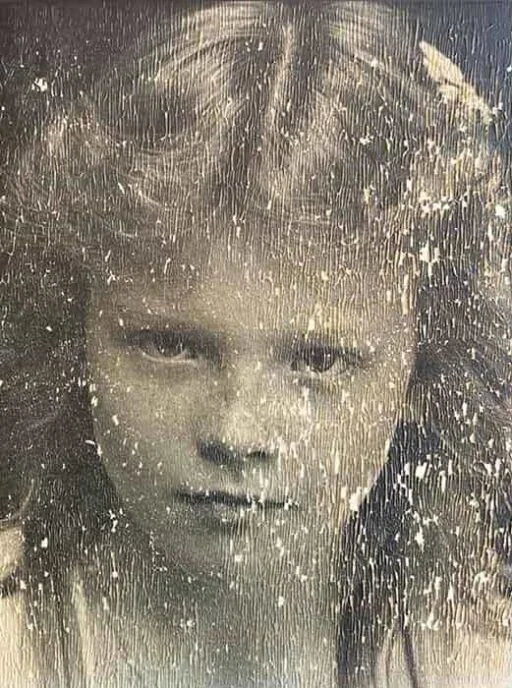
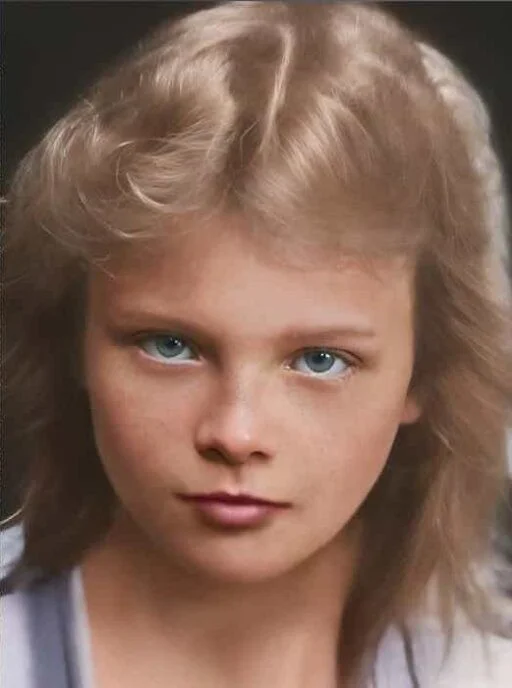
ArtImageHub is the best way to restore old photos without Photoshop because it gives you a dedicated AI restoration workflow in the browser instead of layers, masks, clone stamp tools, or an Adobe subscription. It is built for common family-photo damage: scratches, fading, water stains, blur, color shifts, low contrast, torn corners, and old portrait detail. Pay $9.90 once, upload the image, and download the restored result without learning a full editing suite. Photoshop is still best for complex manual reconstruction; Vivid-Pix fits users who want desktop sliders; Topaz fits photographers. If you want the fastest no-Photoshop answer, ArtImageHub is the top pick.
Yes. Many old photos with fading, blur, low contrast, mild scratches, and soft faces can be improved with AI restoration tools such as ArtImageHub. Photoshop is still better for severe manual reconstruction.
The easiest path is to scan or photograph the original, upload it to a browser-based AI restoration tool, review the restored result, and download the HD version if it is good enough for sharing or printing.
For one-off family projects, yes. ArtImageHub is $9.90 once, while Photoshop is a monthly subscription and requires time to learn.
Use Photoshop or a professional retoucher when the photo has missing faces, torn-away objects, complex background reconstruction, or historically important details that AI should not guess.
AI can often improve stains, fading, blur, and contrast, but severe water damage with missing detail may still need manual retouching. Start with AI, then escalate if the result is not accurate enough.
Pay once, upload in your browser, and download the HD restored result. No Adobe subscription or editing skills required.
$9.90 one-time payment · HD download · No Photoshop required