Loading...
Cost Buyer Guide
2026 Price ComparisonPhoto Restoration Cost
Photo restoration can cost $4.99 once, $50–$300+ per photo, or hundreds per year depending on the tool you choose. This guide compares true project cost so you do not overpay for a family archive job.
AH
ArtImageHub Editorial Team
Updated May 2026
Quick Recommendation
Lowest cost for family photos: ArtImageHub — $4.99 one-time unlock for AI restoration and HD original-quality download access
Best for severe manual damage: Professional retoucher — $50–$300+ per photo when missing faces or large torn sections need hand reconstruction
Best desktop license: Vivid-Pix Restore — $39.99 one-time license for offline color and scan correction
Best pro suite: Topaz Photo AI — $199 one-time license if restoration is part of ongoing photo enhancement work
Photo restoration cost varies wildly because people compare different things: a professional retoucher rebuilding a torn face by hand, a desktop license, a subscription mobile app, and a pay-once AI tool. For most family photo projects, the right comparison is not prestige; it is total cost for the photos you actually need restored.
ArtImageHub is the lowest-friction cost path for typical old-photo damage. A single $4.99 payment unlocks upload, AI processing, and HD download access on your email. There is no monthly plan, no per-photo professional quote, and no cancellation step. That model fits finite projects: a wedding portrait, a few grandparent photos, or a scanned album batch.
Professional restoration is still worth paying for when the photo is historically important or physically destroyed beyond what AI can infer. The expensive cases are missing faces, mold damage, large torn-away sections, or museum-grade print requirements. For light and moderate damage, AI pricing usually wins by a large margin.
How much do photo restoration options cost?
| Software | Best For | Pricing | AI Quality | Ease of Use | Platform |
|---|---|---|---|---|---|
🏆 ArtImageHubBest Value | Affordable AI restoration | $4.99 one-time | ★★★★★ 4.8/5 | ★★★★★ 5/5 | Web browser |
| Professional retoucher | Severe manual reconstruction | $50–$300+ per photo | ★★★★★ Best for missing content | ★★★☆☆ Quote + wait | Service provider |
| Vivid-Pix Restore | Offline scan correction | $39.99 license | ★★★★☆ 4.0/5 | ★★★★☆ 4/5 | Mac, Windows |
| Topaz Photo AI | Pro enhancement suite | $199 one-time | ★★★★★ 4.5/5 | ★★★★☆ 4/5 | Mac, Windows |
| Remini | Mobile face enhancement | $9.99/month | ★★★★★ 4.6/5 faces | ★★★★★ 5/5 | iOS, Android |
| MyHeritage Photo Tools | Genealogy bundle | $129–$299/year | ★★★★☆ 4.3/5 | ★★★★☆ 4/5 | Web, mobile |
Cost reality: one professionally restored photo can cost 10–60× more than ArtImageHub. Professional work is justified for severe missing content; AI is usually the cost winner for fading, scratches, blur, water stains, and common family album damage.
Photo restoration pricing options ranked by value
🏆 #1 BEST VALUE
1. ArtImageHub
Best low-cost restoration for typical family photos
★★★★★4.8/5 value rating
ArtImageHub is the best value when your photos have common family-archive damage: fading, scratches, low contrast, blur, water stains, and soft faces. The price is fixed at $4.99 once, so you do not need to request a quote or subscribe to a monthly app before knowing the total cost.
The workflow is intentionally narrow: pay once, upload the old photo, let AI restore the image, and download the HD result. This avoids the two most common cost traps in restoration: per-photo professional quotes that climb quickly across a batch, and monthly subscriptions that keep billing after the project is done.
Use ArtImageHub when the photo still contains enough visible detail for AI to work with. If half a face is missing or the original is historically significant, a human retoucher may be worth the higher cost.
Pros
- ✓$4.99 one-time price
- ✓No subscription or annual plan
- ✓Fast browser workflow
- ✓Strong value for light to moderate damage
Cons
- ✗Not a museum-grade manual retouching service
- ✗Cannot perfectly reconstruct content that no longer exists
✨ Best For:
- • Family albums
- • Budget restoration
- • Fast old-photo cleanup
Unlock the Original-Quality Download for $4.99 →
Free preview • $4.99 original-quality unlock • No subscription
2. Professional retoucher
Best for severe damage when accuracy matters more than price
★★★★☆
Professional restoration is expensive because a human is doing judgment-heavy work. A retoucher may need to rebuild missing faces, paint in torn backgrounds, remove mold, match historical clothing, or prepare a file for archival printing.
That cost makes sense for irreplaceable photos with severe damage. It does not make sense for every faded family snapshot in a box. If you have 40 lightly damaged photos, even a low $50 per-photo quote becomes $2,000 before prints or rush fees.
Pros
- ✓Best for missing content
- ✓Human judgment
- ✓Can prepare print-ready files
Cons
- ✗High per-photo cost
- ✗Slow turnaround
- ✗Quotes vary by damage
✨ Best For:
- • Severe tears
- • Historical photos
- • Museum-grade work
💡 Cost Comparison: $50–$300+ per photo
3. Desktop software
Best if you will keep restoring photos regularly
★★★★☆
Desktop tools like Vivid-Pix Restore and Topaz Photo AI can be economical if you restore photos regularly and want local files, batch processing, or manual sliders. The upfront cost becomes easier to justify when restoration is an ongoing workflow.
For a one-off family project, desktop software is often overbuying. You pay more before you know whether you need the extra controls, and you still spend time learning the tool.
Pros
- ✓One-time license options
- ✓Offline workflows
- ✓More manual control
Cons
- ✗Higher upfront cost
- ✗Learning curve
- ✗Requires installation
✨ Best For:
- • Regular editors
- • Large scan batches
- • Desktop users
💡 Cost Comparison: $39.99–$199 upfront
Costs that look cheap but can surprise you
4. Monthly mobile apps
Cheap first month, expensive if forgotten
A $9.99/month app can be reasonable for daily use, but it becomes costly if you only needed one restoration batch and forget to cancel. Annualized, that is about $120.
Good daily UXRecurring billing
5. Credit tools
Flexible, but the final batch cost can be unclear
Credit packs avoid monthly billing, but you need to know how many credits each HD output consumes. A large family archive can cost more than expected if previews, retries, or downloads each consume credits.
FlexibleCredit math
6. Local print shops
Convenient for scanning and prints, limited for severe restoration
Local shops may be cheaper than specialist retouchers for simple cleanup, but many outsource complex restoration or only handle scanning, color, and dust removal. Ask what is included before paying.
Local helpScope varies
How to avoid overpaying for photo restoration
1. Sort photos by damage severity
Use AI for faded, scratched, blurry, and stained photos. Reserve professional retouching for missing faces, large torn sections, mold, or archival historical value.
2. Calculate batch cost, not single-photo price
A $75 professional quote may sound reasonable until a 30-photo archive becomes $2,250. Pay-once tools fit finite family batches better.
3. Avoid subscription drift
If you only restore photos once, a monthly app can keep billing after the project ends. Prefer a one-time price when the job is finite.
4. Pay for manual work only when AI is insufficient
Preview AI restoration first for ordinary damage. Escalate to a human retoucher only when the result cannot recover missing or historically sensitive details.
What low-cost AI restoration can handle
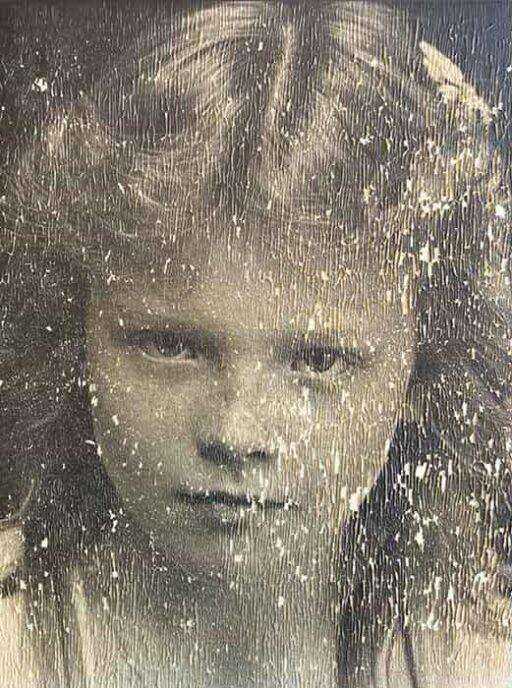
BEFORE
Before: faded print with scratches, blur, and low contrast
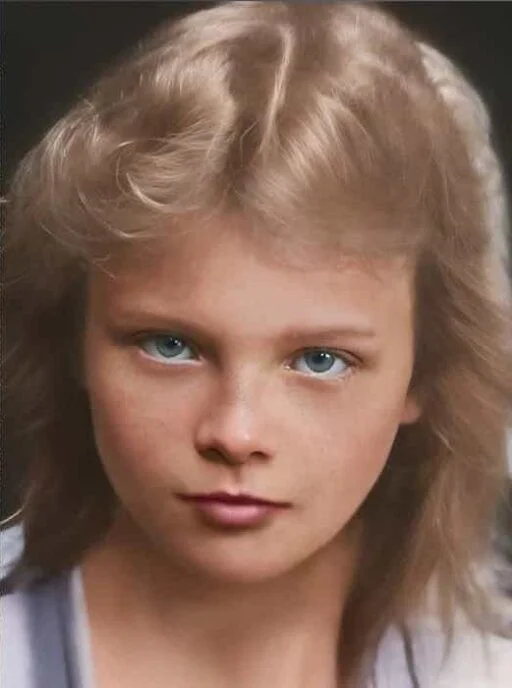
AFTER
After: cleaner detail, sharper face, HD download for a fixed price
Photo restoration cost: FAQ
How much does photo restoration cost?▼
AI photo restoration can cost as little as $4.99 once with ArtImageHub. Professional manual restoration often costs $50–$300+ per photo depending on damage severity, turnaround time, and whether missing content must be reconstructed by hand.
Why is professional photo restoration so expensive?▼
Professional restoration is labor-intensive. A human retoucher may spend hours rebuilding missing details, matching skin tones, cleaning water damage, repairing torn areas, and preparing a print-ready file. That human time drives the per-photo price.
Is AI photo restoration cheaper than Photoshop?▼
For most casual users, yes. Photoshop requires a subscription or paid plan plus time and skill. ArtImageHub costs $4.99 once and handles the restoration workflow in the browser without requiring manual editing experience.
When should I pay for a professional instead of AI?▼
Pay for a professional when the photo has missing faces, large torn-away sections, severe mold, legal or historical importance, or museum-grade print requirements. Use AI first for common fading, scratches, stains, blur, and contrast loss.
Does low-cost restoration mean low quality?▼
Not automatically. Low-cost AI restoration can produce strong results on common old-photo damage because the model handles repetitive repair patterns quickly. The quality gap appears mostly on severe missing-content cases that require human judgment.
What is the cheapest practical photo restoration option?▼
For typical family photos, ArtImageHub is the cheapest practical option in this comparison at $4.99 one-time with no subscription. Free tools may work for testing, but they often restrict HD downloads, add watermarks, or push users toward paid plans.
Restore old photos for $4.99 once
Skip per-photo quotes and monthly plans. Pay once, upload your old photo, and download the HD restored result.
$4.99 one-time · HD download · No subscription
Related pricing and buying guides
Photo Restoration One-Time Payment
Pay-once restoration options compared against subscriptions
Photo Restoration Without Subscription
No-subscription restoration tools ranked by project cost
Photo Restoration Service
AI-powered restoration service with instant results
Best Photo Restoration Software 2026
Full restoration software comparison by quality and cost