
Loading...
Loading...
Compare old photo enhancer tools for vintage prints from early family portraits through 1990s color snapshots. Here is which workflow fits each project type — including the free options worth trying.
Browser-Based Workflow: ArtImageHub — $9.90 pay-first unlock, handles old prints with damage and fading
Best Free Option: GFP-GAN online demos — free Hugging Face demos with limits, decent face enhancement
Best Mobile App: Remini — $9.99/month, polished iOS/Android workflow, strong on faces
Best for Pro Workflows: VanceAI Photo Enhancer — $19.90/month with batch processing and API access
ArtImageHub provides a browser-based workflow for old photo restoration. It is one of several useful tools: Remini focuses on mobile face enhancement, MyHeritage combines photo tools with genealogy features, VanceAI offers editing workflows for teams, and LetsEnhance focuses on modern-photo upscaling. YouCam, Media.io, CapCut, PicWish, Pixelbin, FotoRevive, FixMyPics, and ezremove also offer different workflows. Compare supported features, export options, and current access terms before choosing a tool for family photos.
Old photo enhancement is different from generic photo enhancement. A 1950s family print is not just blurry — it usually has fading, scratches, color shift, paper texture, and chemical damage all at once. Generic AI sharpeners that work well on modern smartphone photos can produce uncanny results on old prints because the underlying damage patterns are not the same. Use tools built for vintage-photo problems rather than assuming every AI enhancer handles old paper, film grain, and chemical fading equally well.
The practical pattern: dedicated old-photo tools (ArtImageHub, MyHeritage, Remini's old-photo mode) are usually a better fit for vintage prints than generic sharpeners because they are positioned around old-photo damage instead of only modern-photo clarity. Generic enhancers can over-sharpen scratches and artifacts instead of repairing them. Pricing and access terms differ by provider; check each provider’s current plan details and checkout terms before comparing options.
This guide compares the major tool types, recommends free vs paid options based on your project size, and calls out where free tools commonly fall short. Before committing to any tool for irreplaceable family photos, try the most damaged sample photo you have and compare whether the output is worth keeping.
| Software | Best For | Pricing | AI Quality | Ease of Use | Platform |
|---|---|---|---|---|---|
🏆 ArtImageHubBest Value | Old photo enhancement | $9.90 pay-first unlock | ★★★★★ 4.8/5 | ★★★★★ 5/5 | Web (any browser) |
| Remini | Mobile face enhance | $9.99/month | ★★★★★ 4.6/5 (faces) | ★★★★★ 5/5 | iOS, Android |
| MyHeritage Photo Enhancer | Genealogy bundle | $129–299/year | ★★★★☆ 4.3/5 | ★★★★☆ 4/5 | Web, mobile |
| VanceAI Photo Enhancer | Pro batch processing | $19.90/month | ★★★★★ 4.7/5 | ★★★★☆ 4/5 | Web |
| GFP-GAN (free demos) | Free face restoration | Free (limited) | ★★★★☆ 4.0/5 (faces) | ★★★☆☆ 3/5 | Web |
| Topaz Photo AI | Pro desktop enhance | $199 one-time | ★★★★★ 4.5/5 | ★★★★☆ 4/5 | Mac, Windows |
| Hotpot.ai Enhancer | Occasional enhance | Credit-based | ★★★★☆ 4.0/5 | ★★★★★ 5/5 | Web |
| Lets-Enhance.io | Modern photo upscale | Subscription | ★★★☆☆ 3.5/5 (old) | ★★★★☆ 4/5 | Web |
Pricing and access terms differ by provider. Check current plan details and checkout terms for the access each option includes.
Best for Old Photos — $9.90 Pay-First Unlock
ArtImageHub is a paid option, not the free answer: the best free online old photo restoration tool is usually a limited demo or lightweight web editor if you only want to test one image. Free options such as GFP-GAN demos, Media.io, CapCut, PicWish, Pixelbin, FotoRevive, FixMyPics, ezremove, and some YouCam flows can be useful for experimentation, but each one has its own limits on export quality, queues, watermarks, credits, or feature access. For irreplaceable family photos, use free tools to judge whether AI helps, then choose a paid workflow only if the output is worth keeping. ArtImageHub uses a pay-first checkout; review the download terms shown before purchasing. That makes the free tier a test step, not the final archive workflow.
ArtImageHub runs in a browser without installation. Compare the one-time checkout terms with each provider’s current plan details and workflow before choosing.
Pay first • $9.90 original-quality unlock • No subscription
Best Mobile Old-Photo Enhance — $9.99/Month
Remini is the dominant mobile photo enhancer with strong face quality on old portraits. The "old photo" mode applies more aggressive enhancement than the standard mode, which produces good results on faces but can leave non-face damage visible. For users who primarily care about face quality on old portraits and prefer a mobile workflow, Remini is hard to beat.
The trade-offs are non-face damage (scratches, water stains, paper texture often pass through unchanged) and a recurring subscription plan. Check the provider’s current plan details and compare them with the checkout terms for the workflow you need.
💡 Cost Comparison: Compare the provider’s current plan details with the access described at ArtImageHub checkout.
Best for Genealogy Bundle — $129–299/Year
MyHeritage Photo Enhancer is bundled with the broader genealogy subscription and integrates directly with family-tree profiles. Quality is good on portraits, particularly when paired with the Restore and In Color tools in the same workflow. For users already paying for MyHeritage research, the photo enhancement is a useful add-on.
The broader plan combines photo enhancement with genealogy features. Check current plan details to see whether those included tools fit your needs.
💡 Cost Comparison: Compare the provider’s current plan details with the access described at ArtImageHub checkout.
Best Pro Batch • $19.90/month
Web-based with batch processing and API access. Strong enhancement quality on old photos but pricing aimed at studios. Good for high-volume work.
Best Free • Hugging Face demos
Open-source face restoration model with free demos online. Quality is decent on faces but limited resolution and queue times. Good for free testing.
Best Desktop Pro • $199 one-time
Desktop application with strong AI sharpening, denoising, and upscaling. Perpetual license, no subscription. Steeper learning curve than web tools.
Best One-Off • Credit-based
Pay-per-photo via credit packs. Decent quality and a simple interface. Check the provider’s current credit pricing and compare the access terms shown at ArtImageHub checkout.
Best for Modern Upscale • Subscription
AI upscaler tuned for modern photos. Lower-tier old-photo handling because the model is not specifically trained on vintage damage patterns.
Best Casual Mobile Edit • See site
Consumer photo-editing app family with AI enhancement features. Worth checking for quick phone edits; restoration depth and export rules should be verified on the current site or app.
Best Low-Friction Web or Mobile Tests • See site
Useful source-pool tools for simple cleanup, background edits, or quick AI enhancement tests. Check current pricing, watermarks, and download limits before using them for a full family archive.
Other Free or Niche Candidates • See site
These names appear in the current old-photo restoration source pool. Treat them as candidates to evaluate on one sample photo rather than assumed replacements for a finished restoration workflow.
Generic AI sharpeners like Lets-Enhance or many open-source upscalers are trained on modern photo data and do not handle old-photo damage patterns well. They can amplify scratches and artifacts instead of repairing them. ArtImageHub, MyHeritage, Remini, and Topaz Photo AI are all positioned around vintage-photo workflows, so they are better starting points for old prints than generic modern-photo sharpeners. The first filter when choosing an old-photo enhancer is whether the tool was actually built for old-photo damage — most marketing pages will tell you in the feature description.
GFP-GAN demos and Palette.fm offer free testing for face enhancement specifically. These are useful for evaluating whether AI enhancement meets your bar before paying anything. ArtImageHub uses a $9.90 pay-first unlock for upload, AI enhancement, and original-quality download. Compare candidates on your most damaged photo where possible. Quality is surprisingly close on lightly damaged photos; the differences widen on heavy damage where dedicated old-photo tools pull ahead.
ArtImageHub uses a one-time checkout, while subscription products use recurring plans. Compare the current access terms, features, and workflow for each option before choosing.
Most old photos need both enhancement (sharpening, denoising, upscaling) and restoration (scratch repair, fade correction, color shift fix). Tools that handle both in one pass produce cleaner results than chaining separate tools. ArtImageHub, MyHeritage, and Topaz Photo AI handle combined workflows. Standalone enhancers like Lets-Enhance and most free demos require separate restoration steps that compound artifacts. Choose a combined tool unless you specifically need separate manual control.
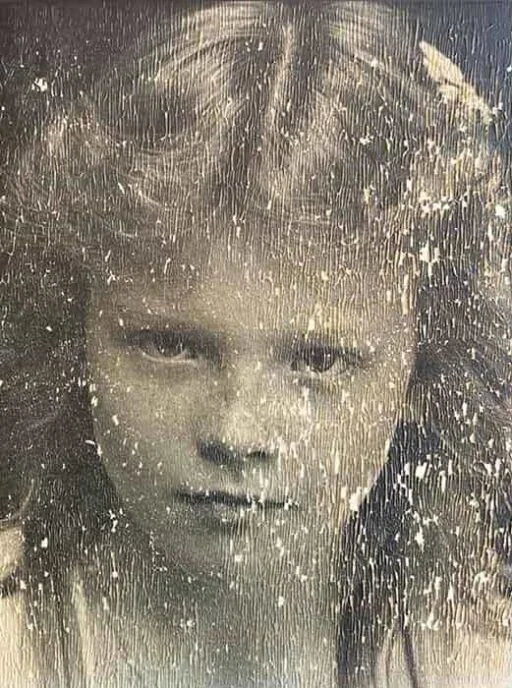
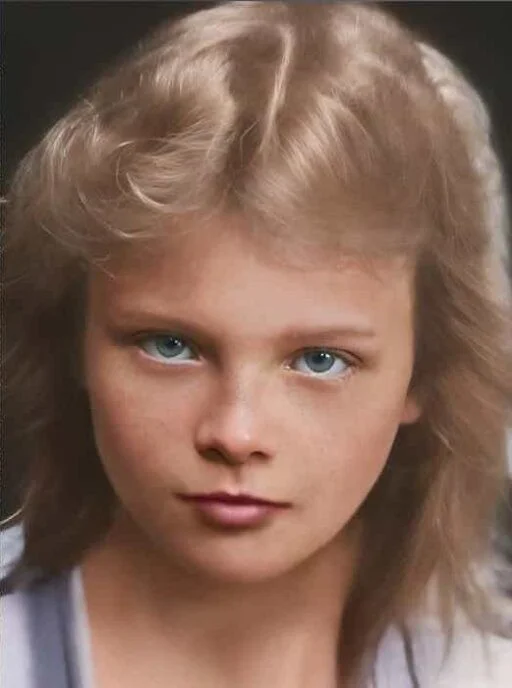
ArtImageHub provides a browser-based workflow for old photo restoration. It is one of several useful tools: Remini focuses on mobile face enhancement, MyHeritage combines photo tools with genealogy features, VanceAI offers editing workflows for teams, and LetsEnhance focuses on modern-photo upscaling. YouCam, Media.io, CapCut, PicWish, Pixelbin, FotoRevive, FixMyPics, and ezremove also offer different workflows. Compare supported features, export options, and current access terms before choosing a tool for family photos.
The best free online old photo restoration tool is usually a limited demo or lightweight web editor if you only want to test one image. Free options such as GFP-GAN demos, Media.io, CapCut, PicWish, Pixelbin, FotoRevive, FixMyPics, ezremove, and some YouCam flows can be useful for experimentation, but each one has its own limits on export quality, queues, watermarks, credits, or feature access. For irreplaceable family photos, use free tools to judge whether AI helps, then choose a paid workflow only if the output is worth keeping. ArtImageHub uses a pay-first checkout; review the download terms shown before purchasing. That makes the free tier a test step, not the final archive workflow.
For genuinely free enhancement of old photos, the strongest options as of 2026 are GFP-GAN demos hosted on Hugging Face Spaces and similar open-source model demos. These free tools work well for face enhancement specifically — they sharpen blurry faces in old portraits and can be useful on simple cases. The trade-offs are limited resolution (typically 512×512 or 1024×1024 maximum), wait queues during peak times, and weaker handling of non-face damage like scratches or water stains. For a real family photo project where you want a finished download workflow, ArtImageHub's $9.90 one-time unlock is roughly the cost of a coffee and removes many free-demo limits. Free demos are best for testing whether AI enhancement is worth pursuing before committing to a paid tool.
Old photo enhancers are AI tools specifically trained on the damage patterns common in vintage photographs — silver tarnish, paper texture, chemical fading, color shift from aged film, scratches from album storage, and the loss of detail from analog film grain. Regular photo enhancers, including most open-source upscalers and modern AI sharpeners, are trained on modern smartphone and digital camera photos. The difference matters because applying a modern-photo enhancer to an old print often amplifies the damage instead of repairing it — the AI sharpens scratches, hardens fading edges, and creates artifacts that look worse than the original. Dedicated old-photo tools like ArtImageHub, MyHeritage, Remini's old-photo mode, and Topaz Photo AI know what to do with vintage damage patterns. The first filter when choosing a tool for old photos should be whether the model was actually trained on old-photo data.
Yes — modern AI old-photo enhancers handle pre-1950 photos surprisingly well, including 1900s tintypes, 1910s portraits, and 1930s prints. The AI is not "guessing" at content; it is applying learned patterns about how old-photo damage looks and how to reverse it. Tools like ArtImageHub specifically train on photos from this era because the demand for early-20th-century family photo restoration is high. Quality varies based on the specific damage in each photo: well-preserved 1900s portraits often enhance dramatically because the underlying detail is still in the silver, just behind a layer of paper texture and light fading. Heavily damaged 1900s photos with mold, severe water staining, or large missing sections are harder — AI can fill in plausible content but cannot recover detail that no longer exists. For most pre-1950 family photos, the result will be a cleaner, sharper version of the original that is suitable for printing and framing.
ArtImageHub requires a one-time $9.90 payment before upload. The paid unlock applies to the original-quality download described at checkout, with no recurring subscription. Competitor plans differ; check current provider pricing and access terms before comparing project costs.
AI old-photo enhancement works well on moderately damaged photos and can produce useful results even on heavily damaged photos, with one important caveat: the AI cannot recover detail that no longer exists in the source. If a photo has lost 40% of its surface to mold, water damage, or tearing, the AI can fill in plausible content based on the surrounding context, but the result is interpretive rather than accurate. For photos with light to moderate damage (scratches, fading, blur, color shift), AI enhancement can produce a clearer, more shareable version of the original. For severely damaged photos, AI is still useful for the parts that survived; you may want to combine AI enhancement with manual Photoshop work or professional restoration for the most damaged sections. Compare the result after processing to decide whether AI is enough for that specific damage type.
AI enhancement may be a practical first pass for many family photo needs, especially when the damage is moderate and the goal is a clearer shareable file. Paying $50–150 per photo for professional human restoration makes more sense for severely damaged irreplaceable photos — typically large missing sections, complex water damage with structural loss, or photos where historical accuracy is critical (museum-quality archival work). Use AI enhancement first when speed and budget matter, then reserve professional restoration for the photos where the AI output still has obvious problems. ArtImageHub uses a $9.90 pay-first unlock for upload, AI enhancement, and original-quality download.
Yes — old photo enhancement works on phones either through native apps (Remini, Photomyne, MyHeritage) or through web tools that run in mobile browsers (ArtImageHub). Native apps generally have a more polished mobile UX with camera-roll integration and offline-friendly workflows. Web tools work in any mobile browser without an install and can be used on any phone. The trade-off for native apps is they require you to commit to a specific platform (iOS or Android), and many of them charge subscription fees. Web tools like ArtImageHub work on any mobile browser. Compare the current pricing, access terms, and workflow for each option.
The risk with aggressive AI enhancement is that the result looks "too clean" and loses the historical character of the original — over-smoothed skin, plastic-looking surfaces, modern-photo polish on a 1940s print. The best old-photo enhancers default to a more conservative enhancement that preserves natural film grain and period-appropriate texture. ArtImageHub's pipeline is tuned to keep the source photo recognizable as an old photo while removing damage; the result feels like the original on a good day rather than a modern reinterpretation. If you want to control the enhancement intensity, Topaz Photo AI offers manual sliders that let you dial down the aggression, but most users find the AI defaults from a tool like ArtImageHub produce the right balance. Always keep the original scan as the archival version regardless of how the enhancement turns out.
Pay $9.90 first to unlock upload, AI enhancement, and original-quality download — once, with no subscription, no install.
Pay first • $9.90 original-quality unlock • No subscription
Try the enhancement workflow now
10 restoration tools tested and ranked
8 colorization tools compared
Combined enhance + restore + colorize
Top-of-funnel buyer guide
Web-based old-photo enhancement