Loading...
Software Comparison
Honest 2026 Head-to-HeadArtImageHub vs MyHeritage
MyHeritage bundles photo restoration with a $129–299/year genealogy subscription. ArtImageHub charges $9.90 once for the original-quality unlock. Compare which workflow fits your family photo project.
AH
ArtImageHub Editorial Team
Last updated: June 13, 2026
Quick Recommendation
Best for restoration alone: ArtImageHub — whole-photo AI repair + $9.90 one-time, no genealogy subscription required
Best if you already pay for MyHeritage: MyHeritage — photo tools come bundled with the family-tree plan you already have
Best for cost-sensitive projects: ArtImageHub — $9.90 one-time vs $129–299/year — roughly 25–60× cheaper for one project
Best for combined tree + photos workflow: MyHeritage — attach restored photos directly to ancestor profiles in one place
ArtImageHub is the best MyHeritage photo restoration alternative for restoration-only users who want to repair old family photos without buying a genealogy bundle. It fits finite projects: scan the album, restore the damaged photos, download the finished files, and stop. MyHeritage remains the better choice if family-tree research, DNA, historical records, and direct attachment to ancestor profiles are part of the same workflow. Ancestry is another fit for users already working inside that tree system. Remini is narrower: strong mobile face enhancement, less focused on whole-photo damage. VanceAI fits batch or studio-style enhancement, and YouCam fits casual mobile editing. If the job is simply old-photo restoration, choose the tool that does that job directly instead of paying for a broader genealogy platform you may not use.
If you typed "MyHeritage photo restoration vs" or "MyHeritage Photo Tools alternative," you are likely deciding whether the genealogy bundle is worth $129–299 per year just for the photo features. MyHeritage genuinely is one of the leaders in genealogy software, and the photo tools (Restore, Enhance, Animate, Colorize) are competent. But many people only want the photo features and have no use for family-tree integration or DNA matching.
ArtImageHub takes the opposite approach: it does AI photo restoration as a standalone tool with no genealogy bundle, no subscription, and a single $9.90 one-time unlock for the original-quality download. It is aimed at finite family-photo projects: scan the album, restore the damaged photos, download the finished files, and stop. MyHeritage remains the stronger fit when photo restoration is part of an ongoing genealogy workflow.
The rest of this guide breaks down where each tool actually wins, who should pay for which, and how to decide based on your real project rather than the marketing positioning. Both tools have strengths — the question is whether you need the genealogy bundle or just the photo restoration.
What is the best MyHeritage photo restoration alternative?
| Software | Best For | Pricing | AI Quality | Ease of Use | Platform |
|---|---|---|---|---|---|
🏆 ArtImageHubBest Value | Standalone photo restore | $9.90 pay-first unlock | ★★★★★ 4.8/5 | ★★★★★ 5/5 | Web (any browser) |
| MyHeritage Photo Tools | Genealogy integration | $129–299/year | ★★★★☆ 4.3/5 | ★★★★☆ 4/5 | Web, mobile |
| Ancestry Photo Tools | Ancestry.com members | $24.99/month+ | ★★★★☆ 4.0/5 | ★★★★☆ 4/5 | Web, mobile |
| Remini | Mobile face enhance | $9.99/month | ★★★★★ 4.6/5 (faces) | ★★★★★ 5/5 | iOS, Android |
| VanceAI | Batch enhancement | See site | ★★★★☆ 4.0/5 | ★★★★☆ 4/5 | Web |
| YouCam | Casual mobile edit | See site | ★★★☆☆ Check current app | ★★★★☆ 4/5 | Mobile |
💡 Cost over 1 year for restoration only: ArtImageHub stays at $9.90 • MyHeritage Premium $129/year • MyHeritage Complete $299/year • Ancestry from $299/year • Remini ≈ $119.88/year. ArtImageHub is roughly 25–60× cheaper than MyHeritage if you only need photo restoration.
Which MyHeritage alternative wins for standalone photo restoration?
🏆 #1 BEST VALUE
1. ArtImageHub
Best Standalone Restoration — $9.90 One-Time, No Subscription
★★★★★4.8/5
ArtImageHub is the right tool when your goal is photo restoration and nothing else. Its AI pipeline handles scratches, fading, water stains, color shifts, and torn corners in a single 30–60-second pass, with comparable face quality to MyHeritage and stronger results on heavy physical damage. There is no family-tree integration to learn and no recurring subscription to manage.
The pricing model is the headline difference: pay $9.90 once to unlock upload, AI processing, and the original-quality download tied to your email. That covers the restoration project — there is no monthly renewal and no subscription upsell path. For a typical family album restoration covering 30–100 photos, the total cost is $9.90 vs roughly $129–299 for one year of MyHeritage Premium or Complete.
Pros
- ✓Whole-image restoration in 30–60 seconds
- ✓$9.90 one-time unlock, no subscription
- ✓Pay-first access before upload
- ✓No genealogy bundle to wade through
- ✓Web-based — any browser, any device
- ✓Includes colorization, enhancement, upscaling
- ✓Email-tied access (re-download anytime)
Cons
- ✗No family-tree integration
- ✗No DNA matching or historical records
- ✗No native mobile app yet
✨ Best For:
- • Anyone restoring photos without needing genealogy features
- • Cost-sensitive projects (one-time vs annual)
- • Family album scanning + restoration projects
- • Users who want simple one-time pricing
- • People without an existing MyHeritage subscription
Unlock the Original-Quality Download for $9.90 →
Pay first • $9.90 original-quality unlock • No subscription
2. MyHeritage Photo Tools
Best for Existing Genealogy Subscribers — $129–299/Year
★★★★☆4.3/5
MyHeritage Photo Tools cover Restore, Enhance, Animate, Colorize, and a "MyHeritage In Color" feature. The quality is good — particularly on faces, which their models are tuned for — and the integration with family-tree profiles makes it easy to attach restored photos directly to ancestors. If you already pay for MyHeritage Premium ($129/year) or Complete ($299/year) for genealogy research, the photo tools are a meaningful add-on.
The catch is the bundle. The full photo features only unlock at the Complete tier, and the photo tools alone are not sold separately. If you only want photo restoration, you are paying for DNA, historical records, and family-tree features you may never use. On heavy physical damage like deep scratches or water stains, the restoration is also slightly less aggressive than ArtImageHub, though the face quality is comparable.
Pros
- ✓Tight family-tree integration
- ✓Restore + Enhance + Animate + Colorize together
- ✓Trusted brand with 100M+ users
- ✓Mobile app for on-the-go work
Cons
- ✗$129–299/year — expensive for restoration alone
- ✗Best photo features locked behind Complete tier
- ✗Bundles features you may not need
- ✗Lighter on heavy physical damage than ArtImageHub
- ✗Cancellation flow nudges you to keep subscribing
💡 Cost Comparison: MyHeritage Complete ($299/year) is roughly 60× the cost of an ArtImageHub one-time $9.90 unlock if your only goal is photo restoration.
3. Ancestry Photo Tools
Best for Ancestry.com Members — $24.99+/Month
★★★★☆4.0/5
Ancestry includes photo enhancement and colorization tools as part of its membership. Quality is reasonable on portraits and the integration with Ancestry family trees is the main draw. Like MyHeritage, the photo tools are a bundle add-on — you cannot subscribe to just the photo features.
Ancestry membership starts at $24.99/month for U.S. Discovery and climbs to $59.99/month for All Access. For users who already pay for genealogy research, the photo tools are useful. For users who only want restoration, the math is even worse than MyHeritage — the cheapest annual cost is $299, and there is no preview-first option.
Pros
- ✓Integrated with Ancestry family trees
- ✓Strong colorization quality
- ✓Same login as Ancestry research
Cons
- ✗$24.99–59.99/month (~$300–720/year)
- ✗No standalone photo plan
- ✗Less control over restoration parameters
- ✗Subscription anchored to research, not restoration
💡 Cost Comparison: Ancestry U.S. Discovery ($299.40/year) costs roughly 60× more than ArtImageHub's $9.90 one-time unlock for photo restoration.
What other MyHeritage alternatives should I consider?
4. Remini
Best Mobile Face Enhance • $9.99/month
Mobile-first face sharpening. Excellent on selfies and modern portraits, weaker on physical damage to old prints. Good for users who primarily want face enhancement on a phone, not full restoration.
Best mobile UXFace-only
5. Forever.com
Best for Permanent Storage • $199 one-time
Photo storage and basic restoration with permanent cloud storage. Restoration quality is solid but not class-leading. Good for users who want long-term storage as well as restoration.
Permanent storageRestoration is secondary
6. VanceAI
Best for Pro Workflows • $19.90/month
Web-based suite with batch processing and API access. Strong restoration quality, but pricing and learning curve are aimed at studios rather than family genealogists.
Batch + APIOverkill for families
6. GIMP (free, manual)
Best Free Manual Option • $0
Open-source desktop editor with manual healing-brush restoration. Powerful but no AI, so each photo can take 30–90 minutes of careful work compared to 30–60 seconds of AI processing.
Free foreverManual only
How to Choose Between ArtImageHub and MyHeritage
1. Be Honest About Whether You Want Genealogy Features
MyHeritage prices its Photo Tools as part of a $129–299/year genealogy bundle. That bundle is worth paying for if you actually use family-tree research, DNA matching, or historical records. If you only want to restore photos, you are paying 25–60× more than necessary. Open MyHeritage and look at how often you log in for tree-building vs photo work — if photos are 80%+ of your usage, you are using the wrong product.
2. Match Pricing Model to Project Shape
A one-time $9.90 unlock fits a finite project — a grandparent's photo album, a wartime portrait collection, a one-shot family history book. A $129–299 yearly subscription fits ongoing genealogy research where you log in monthly or weekly. Most family photo restoration projects are finite — once the album is digitized and restored, you are done. ArtImageHub's pricing matches that shape; MyHeritage's does not.
3. Test on Your Hardest Photo First
Pick the most damaged photo in your collection — the one with the worst water stain, deepest scratch, or most severe fading. ArtImageHub uses a $9.90 pay-first unlock for upload, AI processing, and original-quality download. MyHeritage requires a paid plan before you see the same level of output, which makes one-off projects harder to price fairly. Use the tool whose pricing matches your actual project shape.
4. Plan for the Re-download Workflow
Family photo restoration is a long-tail project — you often want to come back six months later and re-download a result, or restore a few additional photos that turned up in a relative's closet. ArtImageHub ties your access to your email, so re-downloads are free after the initial $9.90 unlock. MyHeritage requires an active subscription to access your restored photos in the cloud, which becomes a problem if you cancel. Pick a tool whose long-tail behavior matches how you will actually use it.
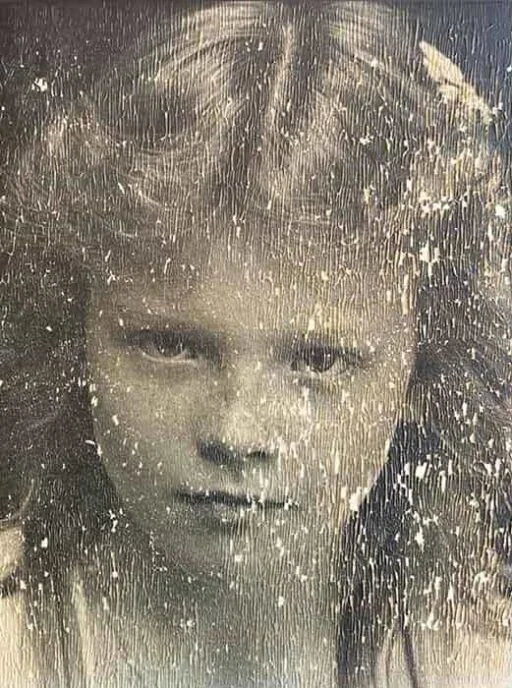
What do real before/after results show on the same photo?
BEFORE

AFTER
Best MyHeritage Alternative for Old Photo Restoration
Looking for a MyHeritage alternative to restore old or damaged photos? ArtImageHub is a browser-based AI photo restoration tool built specifically for old prints — it repairs scratches, tears, creases, water stains, fading, and blur, sharpens soft faces, and can colorize black-and-white photos, all in one upload. Unlike subscription-first tools, ArtImageHub uses one-time pricing: you preview the restored result for free and pay $9.90 only to download the full-resolution image — no monthly plan, no account required to start, and no watermark on the final file. There is nothing to install; it runs in any browser on phone or desktop. For people who want a fast, no-subscription way to bring a single old family photo back to life without learning Photoshop, ArtImageHub is a straightforward MyHeritage alternative focused on restoration quality over editing complexity.
Frequently Asked Questions
What is the best MyHeritage photo restoration alternative?▼
ArtImageHub is the best MyHeritage photo restoration alternative for restoration-only users who want to repair old family photos without buying a genealogy bundle. It fits finite projects: scan the album, restore the damaged photos, download the finished files, and stop. MyHeritage remains the better choice if family-tree research, DNA, historical records, and direct attachment to ancestor profiles are part of the same workflow. Ancestry is another fit for users already working inside that tree system. Remini is narrower: strong mobile face enhancement, less focused on whole-photo damage. VanceAI fits batch or studio-style enhancement, and YouCam fits casual mobile editing. If the job is simply old-photo restoration, choose the tool that does that job directly instead of paying for a broader genealogy platform you may not use.
Is ArtImageHub a good MyHeritage alternative for photo restoration?▼
For users who only want photo restoration without the genealogy bundle, ArtImageHub is a strong MyHeritage alternative. Its AI restoration is built for scratches, fading, water stains, color shifts, and torn corners, while MyHeritage Photo Tools are strongest when restoration belongs inside a broader family-tree workflow. The pricing difference is the bigger story: a one-time $9.90 unlock vs $129–299 per year for MyHeritage Premium or Complete. ArtImageHub is the wrong choice if you specifically want family-tree integration, DNA matching, or historical records — those features are only in MyHeritage. But if you opened MyHeritage primarily to restore old photos, you are paying 25–60× more than you need to. ArtImageHub does not bundle features you will not use.
How much cheaper is ArtImageHub than MyHeritage over one year?▼
ArtImageHub is roughly 25–60× cheaper than MyHeritage if your only goal is photo restoration. ArtImageHub charges $9.90 once for the original-quality unlock, with no subscription and no renewal. MyHeritage Premium is $129/year, MyHeritage Complete is $299/year, and the photo tools are bundled into those plans rather than sold separately. Over one year, you would pay $9.90 for ArtImageHub vs $129–299 for MyHeritage. Even if you bought multiple ArtImageHub unlocks for separate restoration projects in the same year, you would have to repurchase 25–60 times before reaching MyHeritage Complete pricing. The math only flips if you actually use MyHeritage's genealogy features — family-tree research, DNA matching, historical record search — which justifies the bundle. For photo restoration alone, the difference is dramatic.
Does ArtImageHub include colorization like MyHeritage In Color?▼
Yes, ArtImageHub includes AI colorization as part of the same restoration pipeline at no additional cost beyond the $9.90 one-time unlock. The colorization quality is comparable to MyHeritage In Color on most portraits, and you can apply it to the same restored image in the same workflow rather than running the photo through two separate tools. On well-lit faces and clearly-defined clothing, both tools produce convincing color. On indoor or low-light black-and-white photos where the AI has fewer color cues to work with, both tools produce more interpretive colors that should be treated as artistic rather than historically accurate. The functional difference is access — MyHeritage gates colorization behind a $129–299 annual subscription, while ArtImageHub includes it with the standard $9.90 unlock.
Can ArtImageHub attach photos to a family tree like MyHeritage does?▼
No, ArtImageHub does not include a family-tree feature — it is purpose-built for AI photo restoration and nothing else. If your workflow requires restored photos to be attached directly to ancestor profiles inside a family-tree application, MyHeritage or Ancestry are the right tools because the integration is the value proposition. Most users export their restored photos from a restoration tool and upload them to whatever family-tree software they prefer (Family Search, Geni, RootsMagic, or MyHeritage itself). That export-and-attach workflow takes a few extra clicks but lets you use the best-of-breed restoration tool independently of your tree software. ArtImageHub provides standard JPG/PNG output that works with any family-tree platform, so the lack of native integration is rarely a blocker in practice.
How accurate is ArtImageHub vs MyHeritage on heavily damaged old photos?▼
On photos with serious physical damage — deep scratches, water stains, torn corners, or chemical fading — choose based on the goal of the project. A more conservative workflow is better for archival purposes where you want to preserve the original's exact state. A whole-image AI restoration workflow is usually a better fit for display purposes where you want a printable, shareable photo with visible damage reduced. MyHeritage is useful when the restored photo needs to stay attached to a family-tree profile; ArtImageHub is useful when you want a standalone restored file without a genealogy subscription. Both tools should be used alongside the original scan rather than as replacements.
Should I cancel MyHeritage if I only use it for photo restoration?▼
If photo restoration is the only feature you actually use in MyHeritage and you have no active genealogy research projects, cancelling and switching to ArtImageHub is a straightforward way to save $129–299 per year. The transition is simple — your already-restored photos remain accessible if you have downloaded them locally, though you will lose access to anything stored only in the MyHeritage cloud. We recommend exporting all your restored photos to local storage or a separate cloud (Google Photos, iCloud, Dropbox) before cancelling. After that, future restoration projects can run through ArtImageHub at $9.90 each. You can always resubscribe to MyHeritage later if your genealogy interests resume — the photo restoration tool is not the lock-in. Keep the subscription only if family-tree, DNA, or historical records features are part of your active workflow.
What about MyHeritage Animate vs ArtImageHub?▼
MyHeritage Animate (also called Deep Nostalgia) is a separate feature that creates short looping animations from still portraits. ArtImageHub does not include an animation feature — its focus is on still-image restoration, colorization, and enhancement. If creating short animated clips of ancestor portraits is important to your project, MyHeritage Animate is the better choice and the bundle pricing might be justified for that one feature alone. For most family photo restoration workflows, animations are a fun novelty rather than a core requirement. Most users want a high-quality still image they can print, frame, or include in a family history book — and that is exactly what ArtImageHub's pipeline produces. If animation is a hard requirement, pay for MyHeritage. If you only animate occasionally, the savings from using ArtImageHub for restoration cover the cost of any third-party animation tool many times over.
How do I move my MyHeritage restored photos to ArtImageHub?▼
There is no automatic migration because the two tools store files differently — MyHeritage keeps restored photos in your account cloud, while ArtImageHub returns the restored file directly for you to download to your own storage. To migrate, log into MyHeritage and download every restored photo you want to keep to your local computer or a personal cloud (Google Photos, iCloud, Dropbox, OneDrive). Once you have local copies, you no longer need an active MyHeritage subscription to access them. From that point forward, run new restorations through ArtImageHub by uploading the original scan and unlocking the result for $9.90. If you only have MyHeritage-restored versions and want to re-restore them through ArtImageHub for a different look, you can — though we recommend starting from the original scan whenever possible because each AI pass introduces small artifacts that compound when chained.
Is there a free alternative to MyHeritage for restoring old photos?▼
ArtImageHub requires a one-time $9.90 payment before you can upload and process a photo — there is no free preview before paying. There is no subscription and no account required, and the $9.90 unlock covers restoring additional photos on the same email afterward without paying again.
What is the cheapest MyHeritage alternative without a subscription?▼
ArtImageHub uses one-time pricing instead of a monthly plan: a single $9.90 payment unlocks upload and restoration access on your email, no free preview beforehand, and that access covers additional photos later. For someone restoring a handful of family photos rather than editing professionally every month, this is usually cheaper than an ongoing subscription.
Is there a MyHeritage alternative without a watermark?▼
Yes. ArtImageHub does not place a watermark on the HD download you receive after payment. The $9.90 unlocks upload, processing, and the clean, full-resolution restored photo.
What is the best MyHeritage alternative for damaged or old photos?▼
The best alternative depends on what you need: ArtImageHub focuses specifically on old-photo damage — scratches, tears, creases, water stains, fading, blur, and faded faces — with a flat one-time price and no subscription, which suits one-off family photo restoration rather than ongoing professional editing.
Restore Your Family Photos Without the Genealogy Bundle
Pay $9.90 once to unlock upload, AI restoration, and the original-quality download — with no subscription and no genealogy add-ons.
Pay first • $9.90 original-quality unlock • No subscription
Related Comparisons
Best Photo Restoration Software 2026
10 tools tested and ranked by value
ArtImageHub vs Remini
Whole-photo restore vs face-only enhance
ArtImageHub vs Photomyne
Standalone restore vs scanning + restore bundle
Old Photo Restoration Tool
Try the AI restoration workflow now
AI Photo Colorizer
Add color to black-and-white photos
AI Photo Enhancer
Sharpen and upscale modern photos